
KPIs Explained
This page explains every key figure you find on dashboards and in the details table of the Analyzer: what it counts, how it is calculated and how to read it. The examples are the figures of the Purchase-to-Pay perspective with all 5,520 cases. For the basics, see Process Models and Levels: Case, Variant, Process Model.
Before You Start: Cases, Executions, Activity Types
Many figures differ only in what they count:
- Cases: runs of the process, for example purchase orders.
- Executions: single executions of activities. An order with three items has three executions of the item activity.
- Activity types: the different activities, such as "Bestellung erstellt", regardless of how often they happen.
All figures always refer to the cases that match the filters of the dashboard or analyzer tab. See Filter Cases in the Analyzer and Dashboards.
Dashboard Widgets
A new dashboard tab can start with the standard widgets (Add default widgets?); see Create a Dashboard Tab. You add more with the widget selector, grouped into Behavior, Time and Compliance; see Dashboard Widgets.
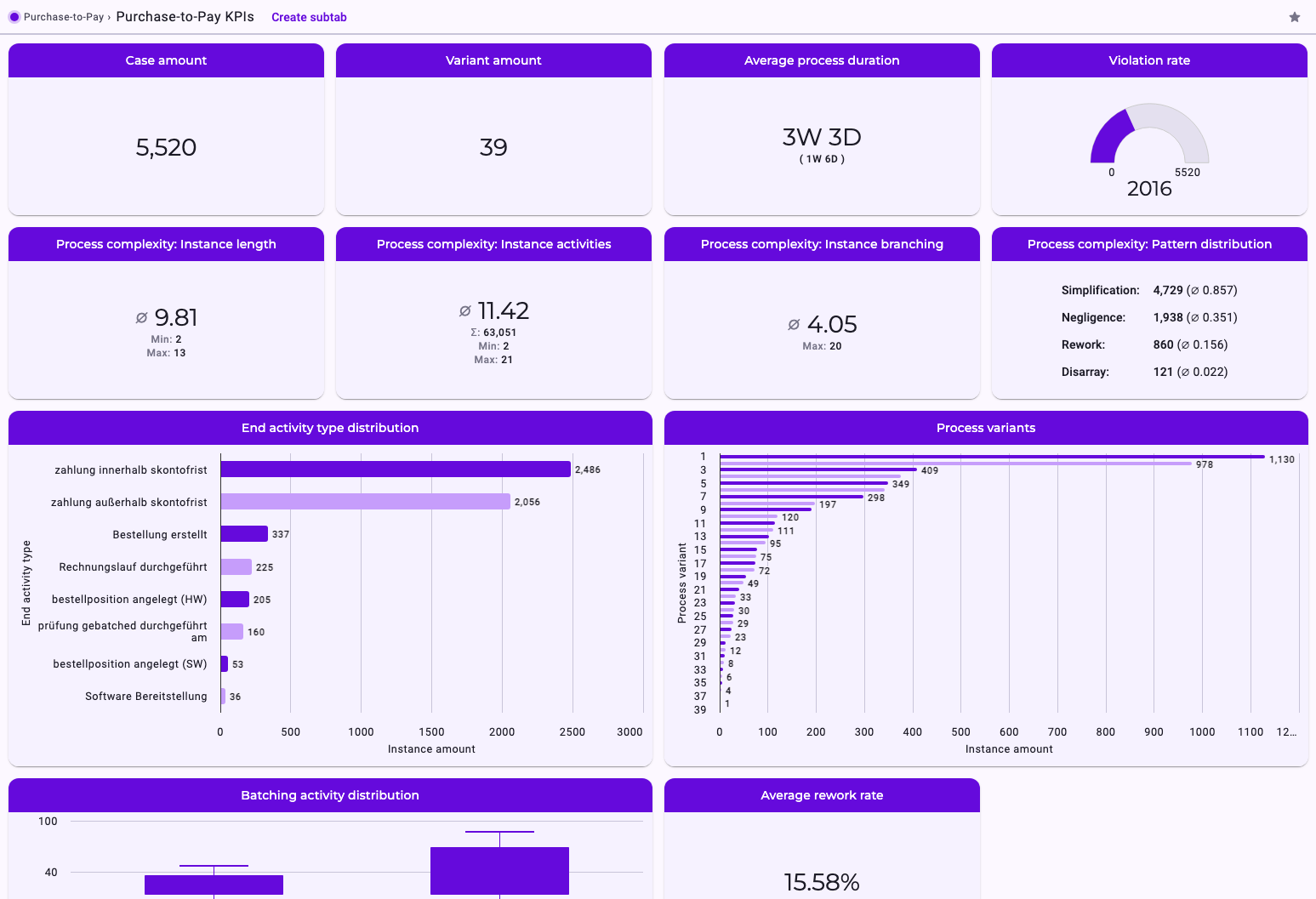
Widget | What it shows | Purchase-to-Pay |
|---|---|---|
Case amount | Number of cases. | 5,520 |
Variant amount | Number of variants among these cases. | 39 |
Average process duration | Average cycle time of the cases, from the first to the last activity of each case. In brackets: the standard deviation, i.e. how much the cycle times typically vary around the average. | 3W 3D (1W 6D) |
Violation rate | The number of cases with at least one order violation (Disarray) or skipped activity (Negligence). The gauge runs from 0 to the number of cases. Allowed deviations (Reorder, Simplification) and Rework don't count. | 2,016 of 5,520 |
Average rework rate | Share of cases with at least one Rework, in percent. | 15.58% |
Process complexity: Instance length | Number of different activity types per case: average, minimum, maximum. | ∅ 9.81, min 2, max 13 |
Process complexity: Instance activities | Number of executions per case: average, total, minimum, maximum. | ∅ 11.42, Σ 63,051 |
Process complexity: Instance branching | How many branches a case has: for each case, the outgoing relationships of all activities that branch, added up. The average only covers cases that branch at all. | ∅ 4.05, max 20 |
Process complexity: Pattern distribution | For each process pattern, the number of cases that contain it, and in brackets that number as a fraction of all cases (0.857 = 85.7%). | Simplification 4,729, Negligence 1,938, Rework 860, Disarray 121 |
End activity type distribution | For each activity a case ended with: the number of cases. A case that ends with several activities in parallel counts under each of them, so the bars can add up to more than the number of cases. Unexpected ends show here too, for example cases that stop after "Bestellung erstellt". | zahlung innerhalb skontofrist 2,486, zahlung außerhalb skontofrist 2,056, Bestellung erstellt 337, … |
Process variants | Number of cases per variant, the most frequent first. | #1: 1,130, #2: 978, … |
Batching activity distribution | For activities executed for several cases at once: how many cases one execution combines, as a box plot per activity. | prüfung gebatched durchgeführt am, Rechnungslauf durchgeführt |
Processes | A list of the case IDs, 15 per page. | – |
Four widgets need settings when you add them:
- Average activity duration: despite its name, the average transition duration between two activities you choose, from the start of the first to the start of the second, with its standard deviation. Only direct relationships between the two count. You can limit it to positive or negative times (Account exclusively for positive or negative values?); see Positive and Negative Times.
- Pie chart: for one activity and one of its properties, how the executions are distributed over the values. The nine most frequent values are shown, the rest as "Others".
- Metric: a main number calculated from a numeric property of an activity over its executions: sum, mean, median, minimum, maximum, range or standard deviation. You can add further numbers of the same property, each with its own calculation.
- Ranking: the five most common values, the five least common values, or both, of a text property of an activity, counted over executions.
The Details Table in the Analyzer
Below the graph, the details table shows figures for what you're looking at: Process details or Case details when nothing is selected, Details for a selected activity or relationship. Hover over the question mark next to a row for a short explanation.
Row | Meaning |
|---|---|
Case amount, Variant amount | As on the dashboard. |
Activity amount | Number of different activity types (Purchase-to-Pay: 17). |
Cycle time (avg.), (min.), (max.) | Average, shortest and longest cycle time of the cases (Purchase-to-Pay: 3W 3D, 1m, 2M 2W). |
Transition time (avg.), (min.), (max.) | For a relationship: the transition duration, from the start of one activity to the start of the next, over all executions of the relationship. Negative times are included; see Positive and Negative Times. |
Start time (avg./rel.) and similar | For an activity: the time from the start of the case to the start of the activity. "abs." rows show the date and time instead. |
Object count (abs.) | For a relationship: how many executions of the first activity took it. See Quantities and Cardinalities. |
Inbound/Outbound cardinality (min./max.) | How many executions are connected on each side of a relationship. See Quantities and Cardinalities. |
Rework count (sum., avg., min., max.) | For each changed execution of an activity: how many later activities had already started when it was changed. Average, minimum and maximum consider only executions with rework. |
Batching included? | Whether executions of the activity were done for several cases at once. |
Process violation present | Whether at least one order violation exists among the cases or on the selected element. |
Associated with process pattern … | Whether the selected relationship is part of a Disarray, Negligence, Rework, Simplification or Reorder. See Process Patterns: Disarray, Negligence, Rework and Allowed Deviations. |
Further rows under Properties show the properties from your data, such as order values; see From Events to Process Model: What Is Aggregated Where.
Good to Know
- Simultaneous activities: activities less than 5 seconds apart are treated as simultaneous, so tiny differences in time stamps don't count as order violations. Changes count as rework only if they happened more than 5 seconds after the later activity started. Both thresholds are set for your whole installation: if 5 seconds don't suit your data, Noreja can change them for you. The new values apply to all perspectives from their next import.
- Durations are shown with their two largest units, for example "3W 3D" or "1D 4h". A month counts as 4 weeks.
- Dashboards and analyzer tabs: the same figure can differ slightly between a dashboard and an analyzer tab if their filters differ. Compare tabs with the same filters.
Related
- Dashboard Widgets
- Process Patterns: Disarray, Negligence, Rework and Allowed Deviations
- Average Time Calculation
- Quantities and Cardinalities
- Glossary