
Tutorial P2P - Error Pattern: Order Change (Rework)
TL;DR
Goal: Synthetically generate subsequent changes to orders that have already been created.
Prerequisites: The previous Simple use cases have been built on the P2P base model.
Result: Exactly 15% of the cases receive an order change with the timestampbestellung_geaendert_am.
The business question
In real P2P processes, orders are not always created once and then processed unchanged.
Typical causes of changes are, for example:
- changed quantities,
- price changes,
- adjustments to delivery dates,
- incorrect order data,
- or requirements changed after the fact.
An interesting process mining question is therefore:
How often are orders worked on again after their original creation, and what influence does this have on the rest of the process?
For this scenario we use the Rework behaviour of the Smart Data Forge.
Desired data picture
In the normal process, an order comes into being once:
Bestellung angelegt
→ further processing
In a rework case, an additional later change point arises:
Bestellung angelegt
→ Bestellung geändert
→ further processing
The original order remains in place. In addition, via:
bestellung_geaendert_am
it becomes visible that renewed processing has taken place.
1. Creating a rework rule
Open: 04 Special Behaviour
and add a new Add deviation rule.
Choose:
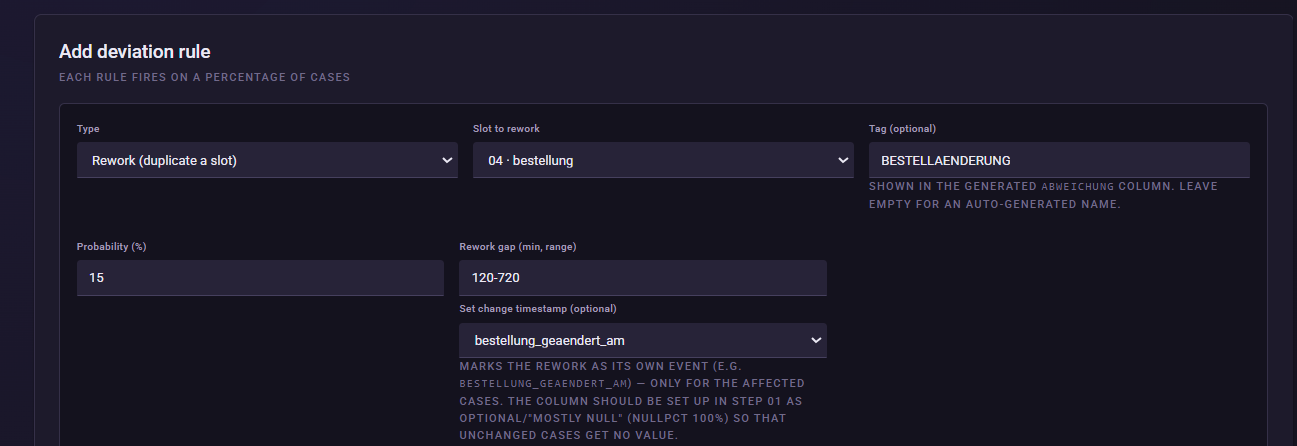
Type: Rework (duplicate a slot)
Slot to rework:
bestellung

The three important rework settings
With Rework, we can control three different aspects.
Change timestamp
Here it is defined which timestamp documents the reprocessing.
For our use case we use:bestellung_geaendert_am
The existing order thereby receives an additional change point.Duplicate stages
With this option, the Smart Data Forge can generate an actual additional repetition.
This is useful, for example, when an activity really should occur again in the event log.Shift downstream
With this option, the additional time caused by the rework is passed on to the subsequent process steps.
If, for example, the order is finished being processed six hours later, the activities lying after it also shift back accordingly.
These three settings allow different rework scenarios:
Only document the change:
Set Change timestamp, Duplicate stages off, Shift downstream off.
Generate a real repetition:
Enable Duplicate stages.
Generate a change with process impact:
Set Change timestamp and enable Shift downstream.
For our P2P example we use the third variant.
2. Selecting the change timestamp
Choose as the:
Change timestamp
bestellung_geaendert_am
This timestamp is already contained in the bestellung table.
This lets us later distinguish clearly:
Normal order: bestellung_geaendert_am = NULL
Order with rework: bestellung_geaendert_am contains a point in time.
3. Defining the rework gap
Set as the:
Rework gap (minutes):
120-720
This way the change takes place between:
2 hours and 12 hours
after the original transaction.
These values correspond to the existing P2P demo configuration.
4. Setting the probability to 15%
Set:
Probability (%): 15
Additionally enable:
exactly N % (fixed rate)
Since in the tutorial we work with:
500 Cases
this means:
15% of 500 = exactly 75 cases
So 75 rework cases arise reproducibly.
This distinguishes this use case from maverick buying. There we used a normal probability. Here we deliberately want to generate a stable number of cases that can easily be checked later.
5. Defining the rework behavior
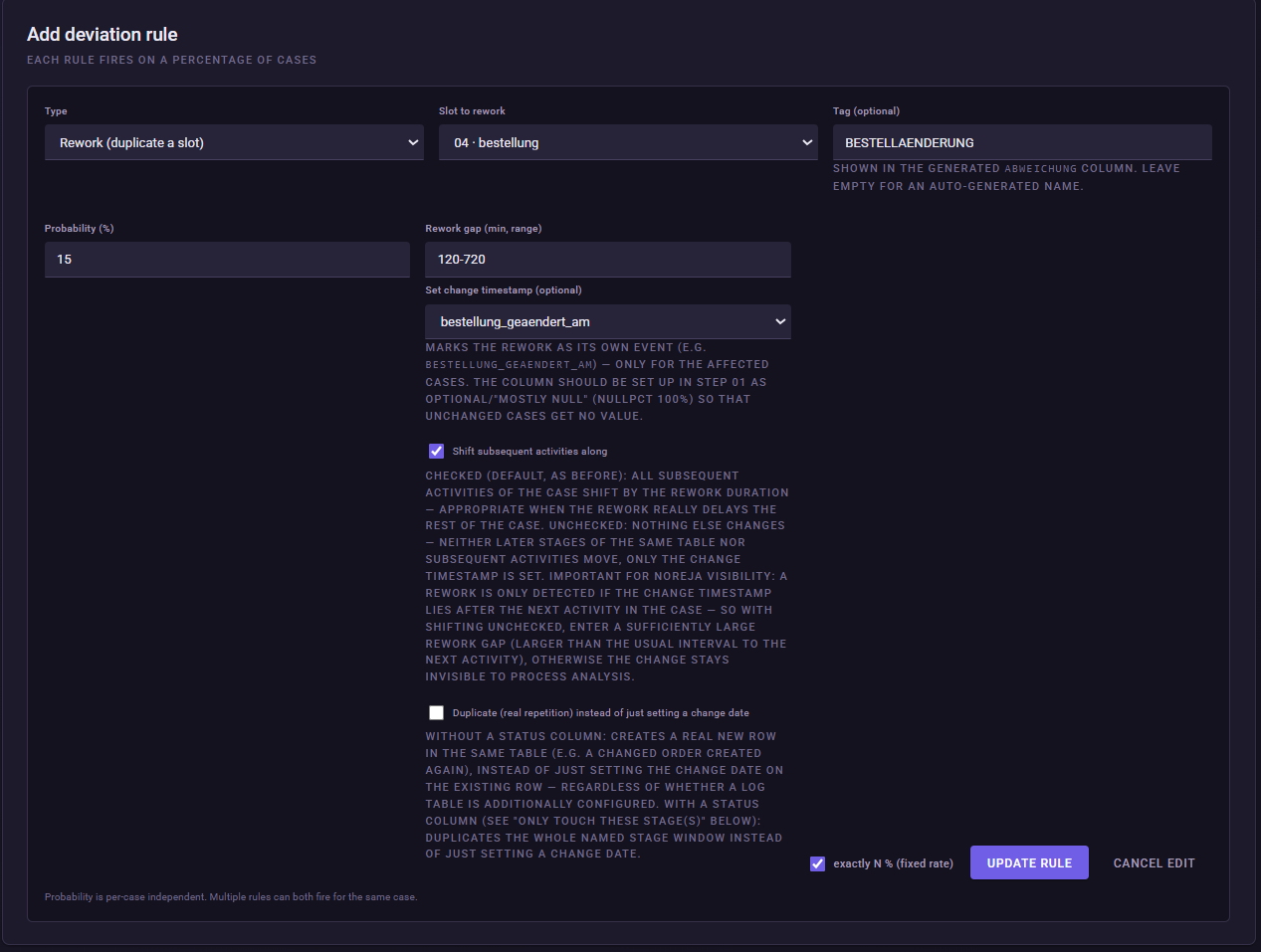
For our order-change use case we use:
Change timestamp: bestellung_geaendert_am
Duplicate stages:
disabled
Shift downstream:
enabled
This way no second order is generated. Instead, the existing order receives a change point and the additional processing time affects the subsequent process steps.
In simplified form, the following arises:
Bestellung angelegt
→ Bestellung geändert
→ Bestellposition
→ Wareneingang
→ further processing
6. Flagging the deviation
Set as the:
Tag:
BESTELLAENDERUNG
The finished rule
| Setting | Value |
|---|---|
| Type | Rework |
| Slot to rework | bestellung |
| Probability | 15 % |
| exactly N % | enabled |
| Rework gap | 120-720 minutes |
| Change timestamp | bestellung_geaendert_am |
| Duplicate stages | disabled |
| Shift downstream | enabled |
| Tag | BESTELLAENDERUNG |
What does rework change in the process?
The decisive difference from the previous use cases is:
With maverick buying, part of the intended process was not executed.
With supplier performance, the process became slower.
With rework, an object that has already been processed is now changed again.
In business terms, the relationship can be represented as follows:
Bestellung angelegt
→ need for change
→ Bestellung geändert
→ additional process time
→ downstream activities shift.
What should I later see in Noreja?
In the data set, exactly 75 of the 500 cases should have a filled:
bestellung_geaendert_am
.
In a process mining analysis, the following questions can arise from this, for example:
How often do order changes occur?
How does the cycle time of orders with and without a change differ?
Are there suppliers, product groups or requesters for whom rework occurs more frequently?
Which downstream process sections are delayed by the change?
Particularly interesting here is the comparison:
Cases without rework
against
Cases with rework
Since the subsequent times are shifted along with it, rework should also have a measurable effect on the overall cycle time.
Rework is not the same as wrong order
With rework, the original sequence is correct in business terms. An object is simply worked on again later.
Example:
Bestellung angelegt
→ Bestellung geändert
With wrong order, by contrast, the actual sequence of process events is violated.
Example:
Bestellung angelegt
→ only afterwards the approval that was actually required beforehand.
We model this difference in the next use case.
Common mistakes / things to watch out for
Enable exactly N %.
Without this option, the 15% would merely be interpreted as a probability per case.
The rework gap is specified in minutes. 120-720 corresponds to 2–12 hours.
Do not enable Duplicate stages automatically.
The option is only needed when an additional repetition really should be generated as an extra row.
Choose Shift downstream deliberately.
If the option is enabled, the additional rework time also affects the rest of the process.
Result
Our synthetic data set now contains three different kinds of process anomalies:
Maverick Buying
→ an intended process branch is bypassed.
Poor supplier performance
→ process steps systematically take longer.
Order change / rework
→ an already-processed object is subsequently changed again.
This makes the data picture increasingly realistic and later enables different kinds of cause and performance analyses.
Next step
Next, we generate a genuine violation of the expected event sequence:
Order before final approval
For this we use Wrong order and generate, in exactly 5% of the cases, an order whose point in time lies before the required final approval.
Next: Purchase-to-Pay Error Pattern Order Before Final Approval - Wrong Order