
Tutorial P2P - Maverick Buying (Skip)
TL;DR
Goal: Generate cases in which certain requesters bypass an approval path that is actually intended.
Prerequisites:Config 1 – Basisis loaded and the approval logic withDUALandDIRECTpaths is in place.
Result: For the requestersKayaandBraun, the intendedDUALapproval branch is skipped in 80% of the relevant cases and the deviation is flagged.
The business question
A typical compliance question in the purchase-to-pay process is:
Are orders carried out even though the approval intended for this transaction was bypassed?
This behavior is often considered under maverick buying.
For our synthetic example, we assume that the requesters Kaya and Braun in particular are conspicuous.
If the regular DUAL approval path were intended for one of their transactions, it should be deliberately bypassed in a portion of the cases.
Desired data picture
In the normal case, the process looks, in simplified form, like this:
bestellanforderung
→ freigabe_a + freigabe_b
→ bestellung
In the maverick-buying case, by contrast, the following should arise:
bestellanforderung
→ bestellung
even though the DUAL approval path was originally intended for this case.
The two approval objects are missing in this case.
It is precisely this missing process pattern that should later become visible in Noreja.
Important: DIRECT is not automatically maverick buying
Our Causal Chain already has a regular DIRECT path.
This means:
A case for which the XOR decision selects DIRECT from the outset is not a deviation. The direct path is part of the intended process model.
Maverick buying only arises when:
DUALwas actually selected for the case,- the case should therefore have traversed the approval path,
- an additional rule then deliberately skips this approval path.
This distinction is important because we later want to distinguish in the analysis between a permissible process variant and an undesired deviation.
Why do we use Team bypass?
Open:
04 Special Behaviour
There, the Smart Data Forge offers, among other things:
Overjump (skip a slot)
and
Team bypass (skip a branch for matching cases)
.
In business terms, our maverick-buying scenario is a bypassing of the approval.
Technically, however, we use Team bypass here, because it is not just a single slot that is to be skipped, but the complete DUAL branch with its approvals.
For this, Team bypass can identify a branch by means of a branch owner and skip it for cases that meet a certain condition.
1. Creating a new deviation rule
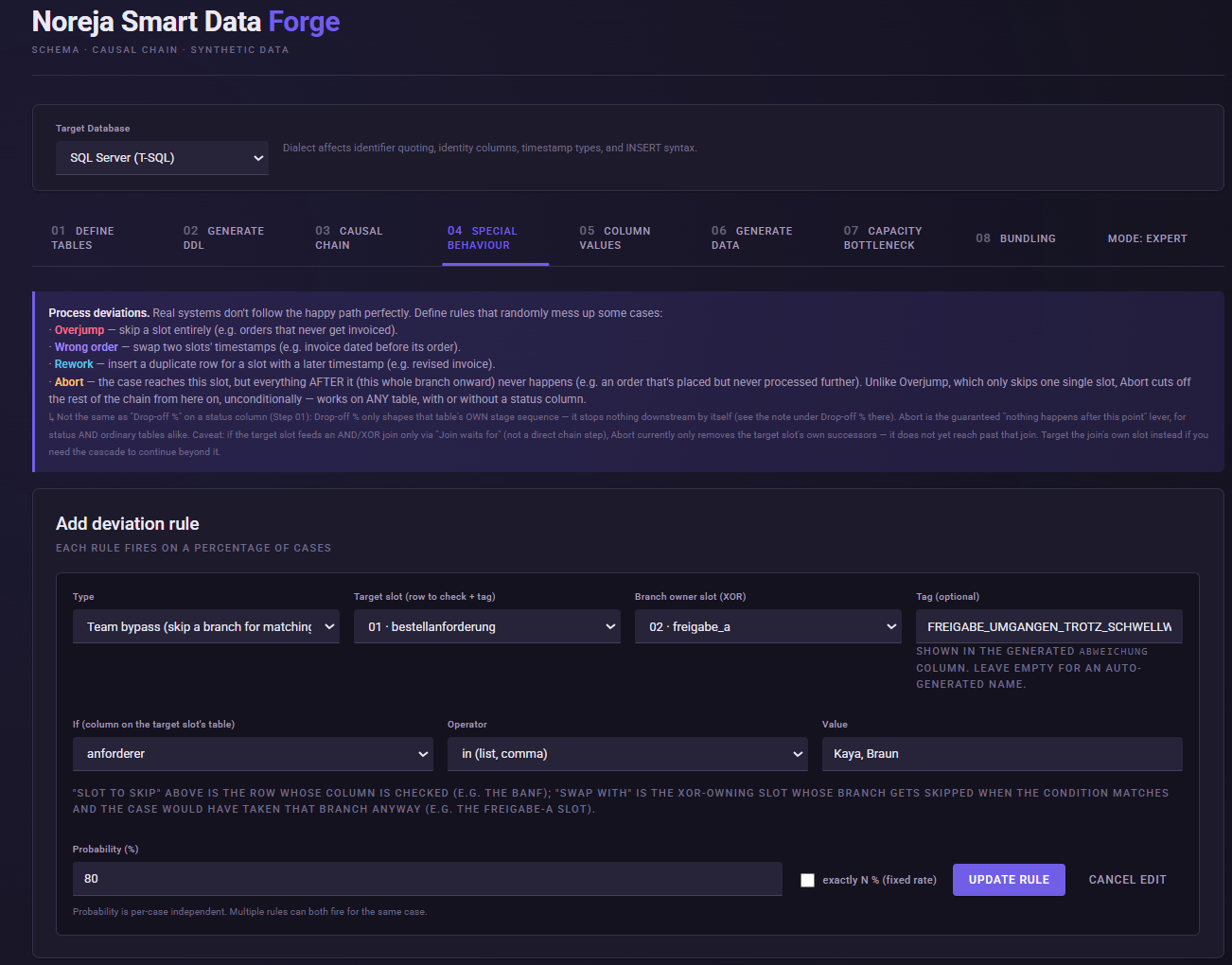
Under Add deviation rule, choose:
Type: Team bypass (skip a branch for matching cases)
2. Starting point of the condition
As the target we use: bestellanforderung
The condition is to be evaluated on an attribute of this object.
In our example, that is: anforderer
This lets us make the process behavior directly dependent on a business data attribute.
This is a key difference from a purely random deviation:
It is not just any case that bypasses the approval; rather, the behavior is deliberately linked to certain requesters.
3. Defining the branch to be skipped
As the Branch owner we choose: freigabe_a
freigabe_a is part of the branch with the tag: DUAL
The engine uses this branch owner to determine the associated branch. When the bypass rule takes effect, the slots of this branch are skipped for the case in question.
As a result, the intended approval steps disappear from the process execution in the corresponding case.
4. Setting the condition on the requester
Configure the condition:
Column: anforderer
Operator: in
Value: Kaya, Braun
With in, the Smart Data Forge interprets the comma-separated values as a list.
The rule therefore applies exclusively to purchase requisitions whose anforderer is either Kaya or Braun.
5. Configuring the probability
Set:
Probability (%): 80
This corresponds to the configuration of the full P2P demo. There, the Team Bypass for Kaya and Braun is likewise set with a probability of 80%.
The interpretation of these 80% is important.
They do not mean that 80% of all 500 cases become maverick-buying cases.
The rule can only take effect when several conditions come together:
- the requester is
KayaorBraun, - the original XOR decision selected
DUAL, - and the 80% probability of the
Team bypassthen applies.
The engine explicitly checks whether the case would originally have taken the branch of the selected branch owner before the bypass is applied.
This produces a considerably more meaningful data picture than a blanket 80% deviation across the entire data set.
Do not use a fixed quota
For this use case, we deliberately adopt the logic of the existing P2P demo:
80% probability, no fixed exactly N % quota.
This way, a probabilistic decision is made for each relevant case.
Unlike later use cases such as rework or wrong order, we do not want to force an exactly specified number of cases to arise here.
This also fits the scenario in business terms: the behavior of certain requesters should have an increased probability, not an artificially exact predefined number of cases.
6. Flagging the deviation
Set as the Tag:
FREIGABE_UMGANGEN_TROTZ_SCHWELLWERT
This tag, too, is adopted from the existing P2P demo.
The tutorial config is prepared so that such tags can be written into:
bestellung.abweichung
.
The finished rule
The configuration can be read, in business terms, as follows:
If the
anfordererof the purchase requisition isKayaorBraunand the case would actually run via theDUALapproval path, this approval branch is bypassed with a probability of 80%.
Technically, this yields:
Target: bestellanforderung
Branch owner: freigabe_a
Condition: anforderer IN (Kaya, Braun)
Probability: 80 %
Tag: FREIGABE_UMGANGEN_TROTZ_SCHWELLWERT
What changes in the data set as a result?
Before the rule, we had two regular variants:
DUAL
Bestellanforderung → Freigaben → Bestellung
DIRECT
Bestellanforderung → Bestellung
After the rule, a third business-relevant pattern is added:
Maverick Buying
Based on the original process decision, the case would have been a DUAL case, but the intended approvals are not executed due to the additional bypass rule.
At first glance, the resulting activity path can therefore look similar to a regular DIRECT case.
However, the reason for this path is a different one.
This is exactly why, alongside the process pattern, we also model the cause via anforderer and the deviation tag.
What should I later see in Noreja?
In the later analysis, it should be possible to identify cases in which:
- a
bestellanforderungis present, - a
bestellungsubsequently comes into being, - the expected approval activities are missing,
- and this behavior is disproportionately associated with the requesters
KayaandBraun.
An interesting analysis question is therefore not only:
"How many orders have no approval?"
but:
"Which causes / attributes explain why certain orders do not go through the intended approval process?"
This turns a simple process variant into a causally interpretable use case.
Common mistakes / things to watch out for
Do not equate DIRECT and maverick buying.
A regular DIRECT case is part of the intended process model. The maverick-buying case only arises through the additional Team bypass.
Do not use Overjump for a single approval slot.
Our approval process consists of a branch. That is why we use Team bypass, so that the complete relevant branch is bypassed.
Do not interpret the 80% as a share of all cases.
The probability applies only to matching Kaya / Braun cases that would originally have taken the DUAL branch.
Result
Our previously clean base model now contains the first deliberately generated process deviation.
In doing so, we did not simply remove approvals at random, but created a relationship:
anforderer
→ increased probability of an approval bypass
→ altered process variant
→ recognizable deviation in the data.
With this, we have applied the central principle of the Smart Data Forge in practice for the first time:
A business hypothesis becomes a controlled, deliberately generated causal data pattern.
Next step
Next, we look at a different type of cause.
This time we do not remove a process step, but change its duration:
How does a poorly performing supplier affect the cycle time of the procurement process?
For this, we configure Globex SE as a conspicuous supplier and use Conditional Rules for the first time.