
Tutorial P2P Expert - Bundling and Sharing Process
TL;DR
Goal: Bundle several invoices into regular common approval runs.
Prerequisites: The Expert P2P model is built and the invoices containfreigabelauf_id.
Result: All invoices due up to a given run are assigned to the next weekly approval run on Friday at 09:00.
The business question
Not every activity is executed immediately as soon as a single object is ready.
In many companies, invoices, for example, are collected and then processed together in a regular run.
The business question is:
How does the process picture change when invoices are processed not independently of one another, but collected in periodic approval runs?
For this scenario we use:
08 Bundling
Desired data picture
Without bundling, invoices are considered as individual objects:
Rechnung A
Rechnung B
Rechnung C
With bundling, several invoices should be assigned to a common run:
Rechnung A ─┐
Rechnung B ─┼→ Freigabelauf Freitag 09:00
Rechnung C ─┘
The approval run thereby itself becomes a business object.
Several invoices reference the same:
freigabelauf_id
This creates a genuine N:1 relationship.
1. Opening Bundling
Switch to: 08 Bundling
and enable: Generate collection run
The Smart Data Forge describes bundling as a periodic collection run: all objects due up to a given appointment are assigned together to one run. Unlike with the capacity bottleneck, there is no limited slot capacity here.
This means:
Capacity Bottleneck
→ An appointment can become full.
→ Surplus objects have to wait.
Bundling
→ All due objects are taken in.
→ No one waits because of a capacity limit.
2. Selecting invoices as the objects to be collected
Set:
Which objects are collected? rechnung
When does an object become due? rechnung_freigegeben_am
This way an invoice counts as ready for the next collection run from its approval onward.
The prepared P2P Expert configuration uses exactly this combination.
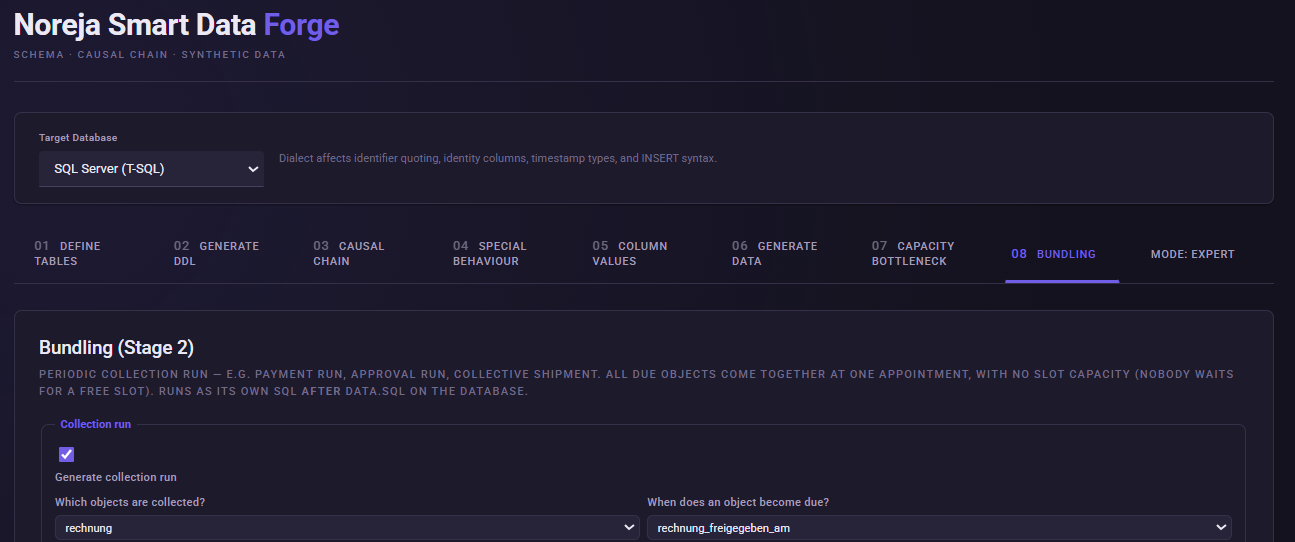
How is an invoice assigned to a run?
The bundling logic looks, for each invoice, for the first run whose point in time is equal to or later than rechnung_freigegeben_am.
Example:
An invoice is approved: Mittwoch 14:00
The next run takes place: Freitag 09:00
The invoice is therefore assigned to this Friday run.
Another invoice, by contrast, is not approved until: Freitag 11:00.
The 09:00 run is already over.
It therefore lands in the: Freigabelauf der folgenden Woche.
3. Creating a new collection object
At:
Target table: choose: Create new table
Collection object table: freigabelauf
Execution timestamp (on the collection object): freigabe_am
Role/group column (optional): rolle
The table does not have to be created beforehand under Define Tables.
It is created automatically when the generated bundling SQL is executed.
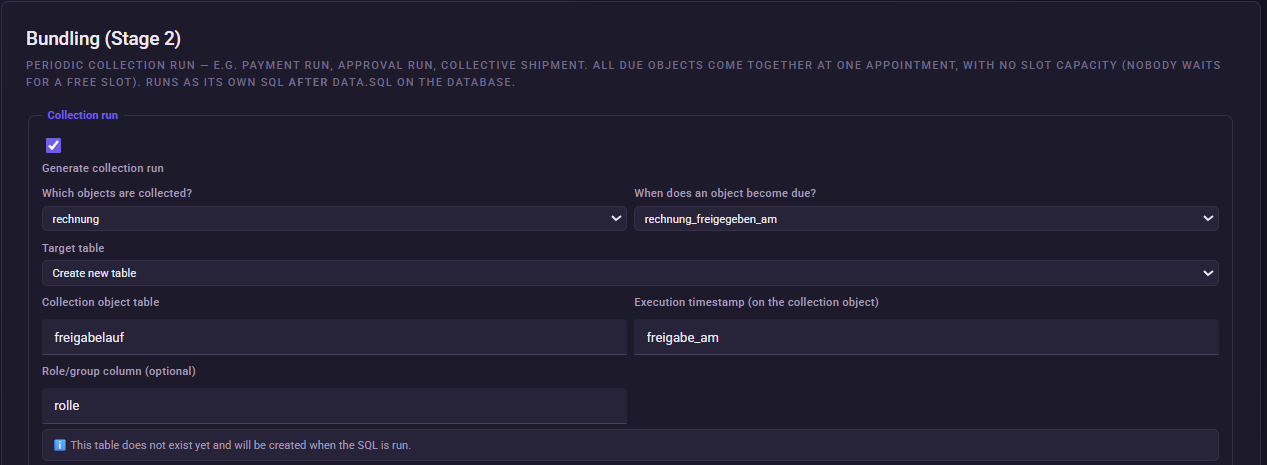
What does freigabelauf contain?
In our scenario, the SQL generates a table with information such as:
freigabelauf_id
freigabe_am
rolle
anzahl
Here anzahl stands for the number of invoices that were assigned to this run.
Example:
| freigabelauf_id | freigabe_am | rolle | anzahl |
|---|---|---|---|
| 1 | Freitag 09:00 | Kreditoren | 7 |
| 2 | Freitag 09:00 | Kreditoren | 11 |
| 3 | Freitag 09:00 | Kreditoren | 5 |
This later allows analyzing not only the individual invoice, but also the collection run itself.
4. Connecting invoices with the approval run
Link on the business object (FK): freigabelauf_id
After generation, the bundling SQL writes the ID of the assigned run back into the respective invoice.
This creates:
rechnung.freigabelauf_id
→ freigabelauf.freigabelauf_id
Several invoices can point to the same approval run.
It is exactly this that creates the desired N:1 structure.
5. Configuring the weekly run
Run hour: 9
Frequency: weekly
Weekday: friday
every Friday at 09:00.
6. Assigning a role
Roles/groups (round-robin per run) : Kreditoren
This gives the generated approval run:
rolle = Kreditoren
The engine supports several roles and would distribute these per run in a round-robin procedure. For our P2P example, however, we deliberately use only one role.
The finished configuration
| Setting | Value |
|---|---|
| Generate collection run | enabled |
| Which objects are collected? | rechnung |
| When does an object become due? | rechnung_freigegeben_am |
| Target table | Create new table |
| Collection object table | freigabelauf |
| Execution timestamp | freigabe_am |
| Role/group column | rolle |
| Link on the business object | freigabelauf_id |
| Run hour | 9 |
| Frequency | weekly |
| Weekday | Friday |
| Role/group | Kreditoren |
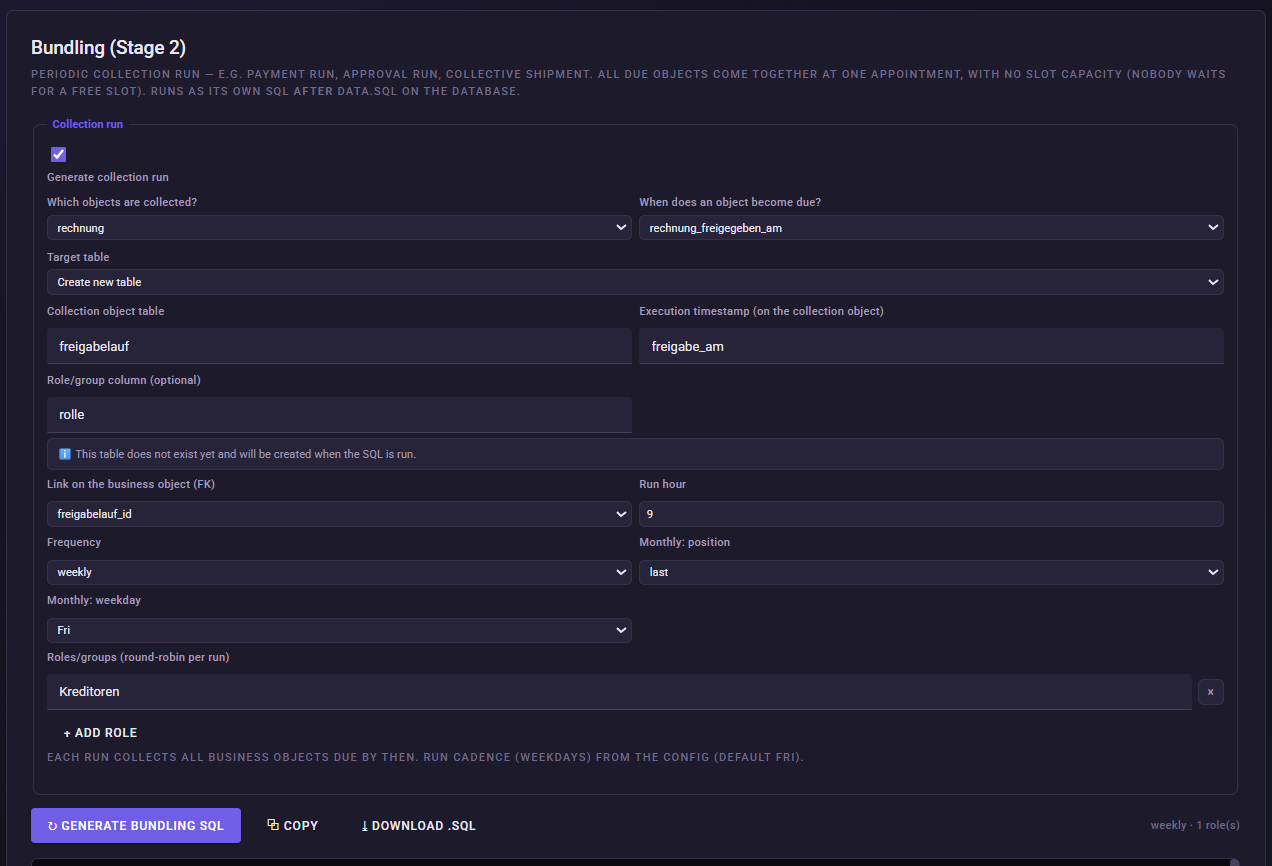
Capacity Bottleneck vs. Bundling
The two Expert functions look similar at first glance, but model different business situations.
Capacity Bottleneck
There are fixed appointments and limited capacity.
Example:
20 Prüfungen warten
→ capacity 16
→ 4 inspections move to the next appointment.
The decisive mechanism is:
resource scarcity.
Bundling
There are likewise fixed appointments, but no capacity limit.
Example:
20 Rechnungen warten
→ Freitag 09:00
→ all 20 invoices are processed in the run.
The decisive mechanism is:
deliberate collecting up to a periodic appointment.
Thus capacity and bundling both create temporal clusters, but from completely different causes.
What does bundling change on the invoice?
Bundling does not simply generate a new timestamp on each invoice at random.
Instead, we generate a separate business object: freigabelauf
and link the invoice to this object via: freigabelauf_id.
The run has its own: freigabe_am timestamp.
This way, several invoices can reference exactly the same run.
This is particularly interesting for causal process mining, because the collection run is preserved as an independent object.
Generating the bundling SQL
Click: Generate bundling SQL
The bundling is generated – just like the capacity logic – as a separate SQL script.
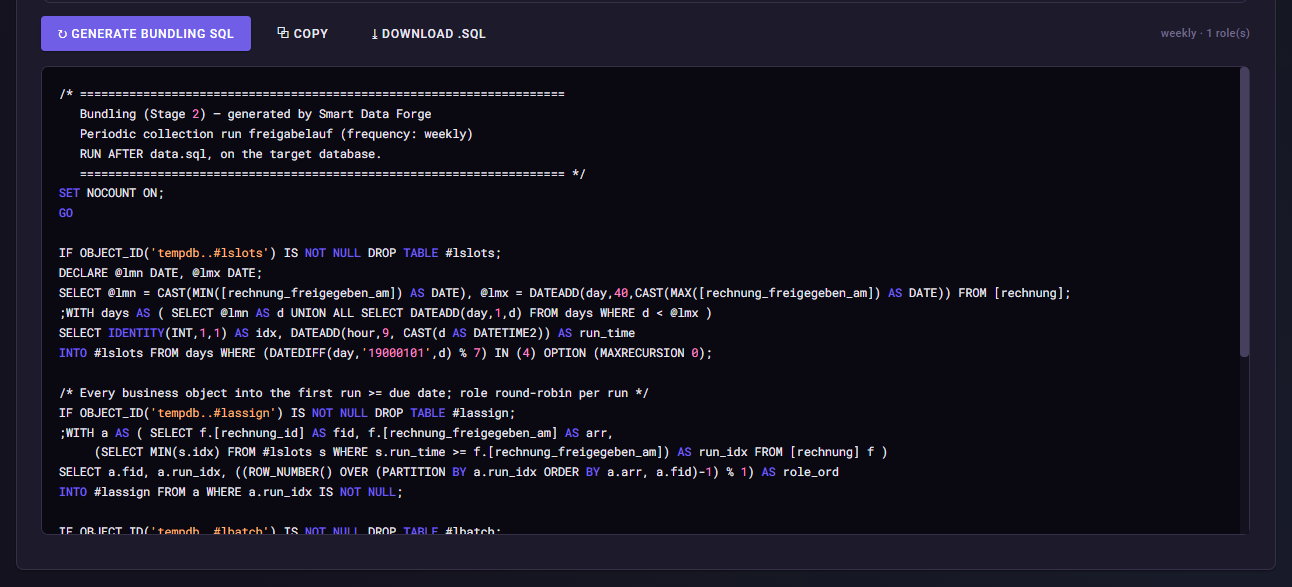
Order of the SQL scripts in the Expert scenario
For our complete Expert scenario we use the following order:
data.sql
→ generates the actual P2P data
capacity.sql
→ generates inspection-station backlog, delay propagation and cash-discount loss
bundling.sql
→ assigns the invoices that then exist to the approval runs.
This order is sensible for our scenario, because the capacity SQL can change rechnung_freigegeben_am. The bundling should then work with the already-updated invoice times.
What should I later see in Noreja?
In Noreja, several invoices should run toward the same:
freigabelauf
.
Typical patterns are:
Rechnung A ─┐
Rechnung B ─┼→ Freigabelauf
Rechnung C ─┘
This allows analyzing, for example, the following questions:
How many invoices are processed on average per approval run?
How long does an invoice wait between its approval and the next approval run?
Which weekdays or run times systematically create waiting time?
How strongly does the volume of the individual approval runs fluctuate?
Which invoices narrowly miss a run and have to wait almost an entire week?
This last case in particular shows a typical bundling effect:
An invoice at:
Freitag 08:55
can still be assigned to the run at:
09:00
.
An invoice at:
Freitag 09:05
by contrast, has to wait until the next weekly run.
Common mistakes / things to watch out for
Do not confuse bundling with capacity.
With the approval run there is no capacity limit. All due invoices are taken in.
Use the correct due timestamp.
For our example this is rechnung_freigegeben_am.
Set freigabelauf_id as the link.
Only this creates the relational connection between invoice and collection run.
Observe the SQL order.
In the complete Expert scenario, bundling.sql should be executed after the capacity SQL, so that already-propagated invoice times are taken into account.
Result
Our Expert data set now contains two different kinds of joint processing:
Capacity Bottleneck
→ several objects compete for a limited resource.
Bundling
→ several objects are deliberately collected up to a common processing appointment.
The approval run thereby itself becomes a business object and connects several invoices via a genuine N:1 relationship.
With this, the Expert part of the demo training is complete.
Concluding the Expert model
Save the current state as:
Config 3 – Expert
The Expert model now contains, in addition to the Simple model:
PHYSICAL and SOFTWARE procurement paths
goods-receipt inspection
capacity bottleneck
backlog
delay propagation
calculated cash-discount loss
bundling with weekly approval runs
With this, the complete training model is ready for the subsequent analysis in Noreja.