
From Data Source to Perspective: How the Builder Works and Who Does What
Before anyone can analyse a process in Noreja, its data has to be connected and described. That happens in the Builder, in three building blocks: a data source, an entity and a perspective. This page explains how they fit together and who usually does what. To try the whole way once, follow Your First Project: From Data Source to Dashboard and Minerva.
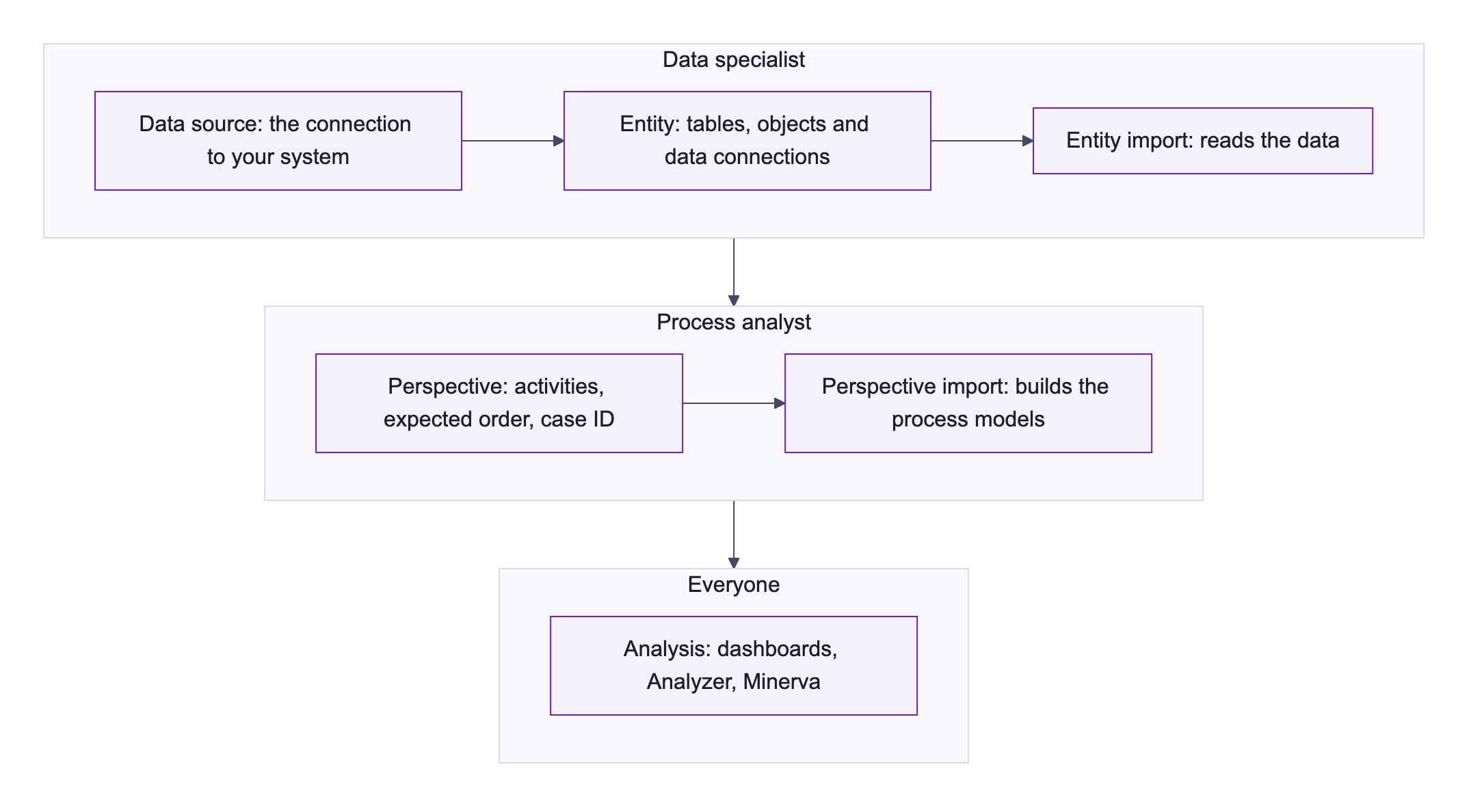
The Three Building Blocks
Building block | What it is | Builder menu |
|---|---|---|
Data source | Noreja's read-only connection to a database or business system, for example SQL Server, SAP HANA or ServiceNow. | Sources |
Entity | Which tables of the data source Noreja reads, as which events (objects with their activity names and time stamps), and how their rows belong together (data connections). The entity import reads the data. | Entities |
Perspective | The view on a process that you analyse: the activities it includes, the order in which they are expected (the expected order) and what one case is (the case ID). The perspective import builds the process models from the entity's data. | Perspective |
One data source can feed several entities, and one entity several perspectives. Each perspective uses only the activities of the entity it needs, so the same entity can carry, for example, a perspective on the whole purchasing process and one on invoice processing only.
See Connect a Data Source, Entities Explained and Create a Perspective.
Who Does What
- IT prepares the system: a user with read access and network access for Noreja. See the section for your system in Connect a Data Source, for example Prepare Microsoft SQL Server.
- Data specialists know the tables. They connect the data source, build the entity and import it. See Create an Entity, Manually or with Suggestions.
- Process analysts know the process. They build the perspective, decide what counts as normal and import it. They don't need to know the tables. See The Expected Order: Perspective Hypothesis, Shortcuts and Backjumps.
- Everyone else works with the result: dashboards, the Analyzer and Minerva. See Your First Analysis: From Dashboard to Minerva.
In small teams one person often does all of it. These roles are a typical division of work, not something you have to set up; see Set Up Noreja for Your Company: Who Does What.
Context for Minerva
Both builders let you add knowledge that the data doesn't contain, so Minerva can explain findings in business terms: in the entity for each activity (right-click an object and choose Context), in the perspective for the whole perspective (on its summary page). This context is stored in the Context Hub, where it can also be added and managed. See Configure Objects and Relationships, Create a Perspective and Context Hub: Knowledge for Minerva.
Permissions
All three building blocks belong to one feature, Builder, in the roles: Read to see them, Create, Edit and Delete to work on them, Share to share entities and perspectives. A role can't limit someone to perspectives only. Deleting a data source also deletes all entities and perspectives built on it, also those of other people, so give Delete with care. Context in the builders needs the feature Context as well. See Create and Edit Roles.
Entities and perspectives can be shared with colleagues; data sources can't. Sharing a perspective doesn't share its entity. A perspective or entity shared with everyone shows every user the Builder. See Share Your Work with Colleagues.
The Order Matters
- A perspective can only be created on an imported entity, and only imported once its entity is imported. While the entity is being imported or has changes that aren't imported yet, its perspectives show Blocked due to parent entity configuration changes.
- While one of its perspectives is being imported, an entity can't be changed: Editing is currently not possible due to an ongoing import.
- Analysts keep working with the last successful import while a new one runs.
See Import Entities and Perspectives: Status and Errors.
Related
- Entities Explained
- The Expected Order: Perspective Hypothesis, Shortcuts and Backjumps
- Set Up Noreja for Your Company: Who Does What