
Process Patterns: Disarray, Negligence, Rework and Allowed Deviations
Noreja compares every case with the expected order of its perspective. Where a case deviates, it recognises one of five process patterns: two violations of the order, Rework as a violation type of its own, and two allowed deviations. This page explains each pattern, how Noreja detects it, where you see it and what it usually means for your process. For the expected order itself, see The Expected Order: Perspective Hypothesis, Shortcuts and Backjumps.
The Five Patterns at a Glance
Pattern | What happened | Type | Cases in Purchase-to-Pay |
|---|---|---|---|
Disarray | Two activities that depend on each other happened in the wrong order. | Violation | 121 |
Negligence | An expected activity was skipped. | Violation | 1,938 |
Rework | An activity was changed after a later activity had already started. | Violation of its own kind | 860 |
Simplification | Activities were skipped along a relationship marked as Shortcut. | Allowed | 4,729 |
Reorder | The case went back along a relationship marked as Backjump. | Allowed | – |
The figures come from the widget Process complexity: Pattern distribution. A case can contain several patterns, so the numbers don't add up. Purchase-to-Pay has no backjump, so it has no Reorder.
Disarray: Wrong Order
A Disarray means that an activity happened before another activity it depends on according to the expected order, for example an invoice entered before the goods were received when the expected order puts the goods receipt first.
- Only activities that depend on each other, directly or via other activities, are compared. Activities on parallel branches are never in Disarray.
- Activities less than 5 seconds apart count as simultaneous, so tiny differences in time stamps don't create a Disarray. Noreja can change this threshold for your installation; see KPIs Explained.
- A step back along a relationship marked as Backjump is a Reorder instead.
Negligence: Skipped Activity
A Negligence means that a case went from one activity to another without the activities expected in between, for example an order paid without the invoice ever being released. A case that begins or ends at an activity where it isn't expected to also counts as Negligence.
- A skip along a relationship marked as Shortcut is a Simplification instead.
- The skipped activity appears in the graph as an omitted or optional activity when you switch on Hypothetical behavior.
Rework: Changed Afterwards
Rework is based on the change time stamp of an activity: an activity was changed after a later activity had already started, for example an order changed after the goods receipt. The change has to come more than 5 seconds after the start of the later activity.
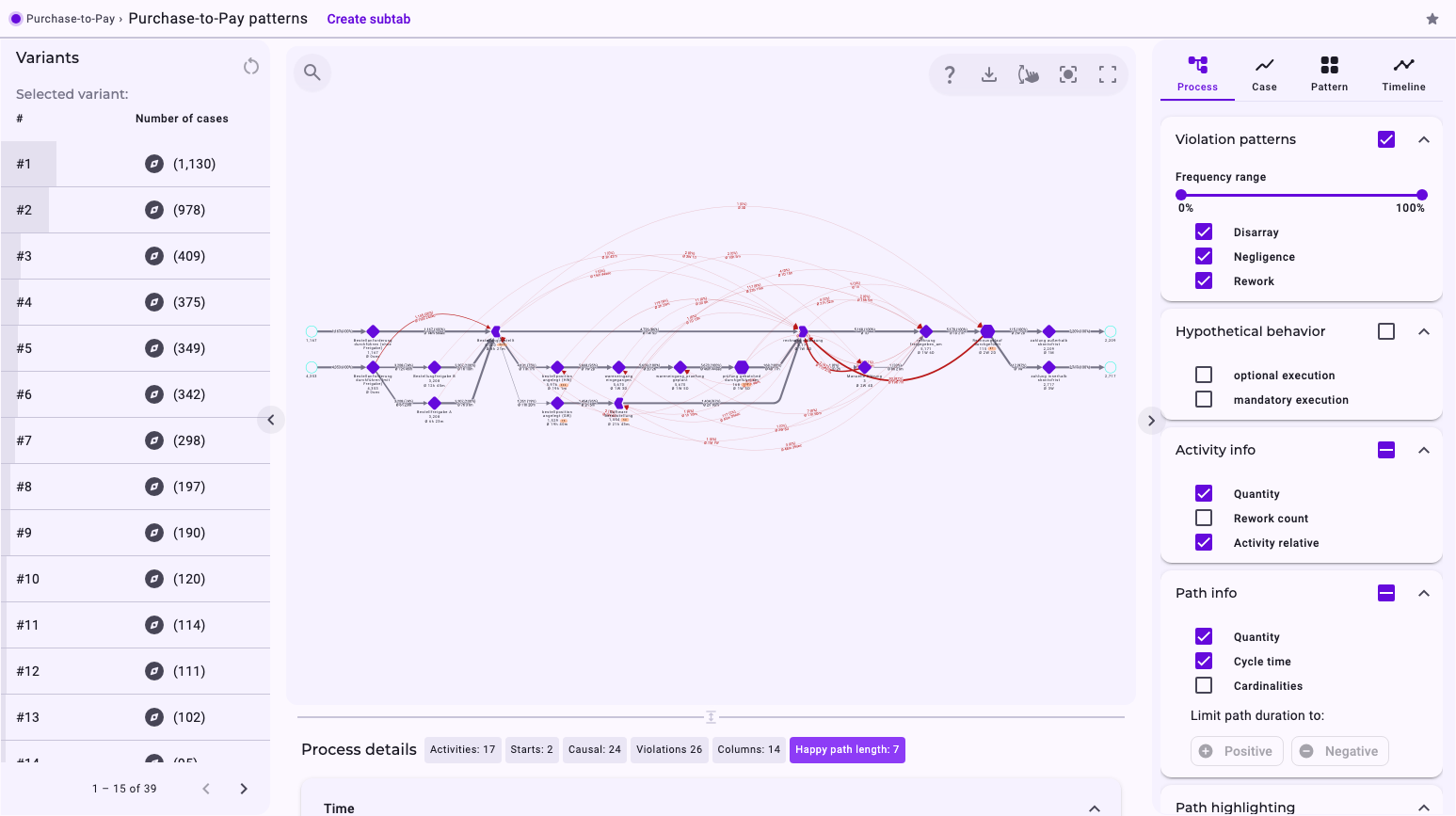
- Rework is shown as a red violation path and counted in the Average rework rate and the Rework count.
- Rework is a violation type of its own: it doesn't count towards Violation rate or the filter Violations, which only consider Disarray and Negligence. To find cases with rework, use the filter Process pattern with Rework.
- A backjump does not excuse Rework.
In Purchase-to-Pay, 860 cases (15.58%) contain Rework. "rechnung erfassung" alone has a Rework count of 769: added up over its changed executions, that many later activities had already started when they were changed.
Simplification and Reorder: Allowed Deviations
- Simplification: a case skipped activities along a relationship you marked as Shortcut. It's planned behaviour, for example orders that need no separate approval.
- Reorder: a case went back along a relationship you marked as Backjump, for example to correct an invoice.
Allowed deviations are not violations: they don't count towards Violation rate or the filter Violations, and they are drawn as normal relationships.
Where You See the Patterns
- In the process graph: under Violation patterns, tick Disarray, Negligence and Rework to show them as red relationships. Under Path highlighting, choose Simplifications or Reorder to colour the allowed deviations. See Elements in Noreja Process Graphs.
- In the details table: when you click a relationship, rows such as Associated with process pattern “Negligence” tell you which patterns it belongs to.
- As a filter: Process pattern keeps the cases that contain the patterns you choose; Violations keeps the cases with or without a violation (Disarray or Negligence). See Filter Cases in the Analyzer and Dashboards.
- On dashboards: Violation rate, Average rework rate and Process complexity: Pattern distribution. See KPIs Explained.
What the Patterns Mean for Your Process
Not every deviation is a problem, but each violation pattern tends to affect time, cost and quality differently:
Pattern | Time and cost | Quality |
|---|---|---|
Disarray | Depends on the case; often extra coordination. | Usually lower: steps happen without the result they depend on. |
Negligence | Lower: fewer steps. This is why skipped steps can look like an improvement in the figures. | Often much lower: checks or approvals are missing. |
Rework | Higher: work is done again. | Can improve, if the rework repairs an error. |
In Purchase-to-Pay, the 2,016 cases with violations have an average cycle time of 2W 2D, compared with 3W 3D for all cases. Skipped steps may be one reason. Another may be incomplete cases: an unexpected end also counts as Negligence, so cases that stop early, such as the 337 orders that end after "Bestellung erstellt", are part of this set and pull the average down.