
Positive and Negative Times
The transition duration on a relationship in the process graph is measured from the start of the first activity to the start of the second. Usually the second activity starts later, so the transition duration is positive. But it can also start earlier, which gives a negative time. This page explains where negative times come from, how they affect the figures, and how to look at positive and negative times separately.
Positive and Negative Times
- Positive: the second activity started at the same time as or after the first one. This is the normal case.
- Negative: the second activity started before the first one.
A relationship, and so a transition duration, exists only between activities that depend on each other in the expected order; activities on parallel branches get no time at all. Negative times occur where the order in the expected process differs from the order in reality, for example when an invoice is entered before the goods have arrived. They can also point to data issues, such as time stamps that were recorded late or in the wrong time zone. See The Expected Order: Perspective Hypothesis, Shortcuts and Backjumps.
Negative Times Lower the Average
By default, the average transition duration of a relationship includes all times, positive and negative. Negative times pull the average down and can hide how long the step usually takes.
Example from Purchase-to-Pay, the relationship from "Software Bereitstellung" to "rechnung erfassung":
Limit path duration to: | Quantity | Average transition duration |
|---|---|---|
nothing selected (all times) | 1,404 | 2 h 7 min |
Positive | 1,404 | 2 h 17 min |
Negative | 119 | −45 min |
For 119 software provisionings, an invoice was entered before the software was provided. Without these negative times, the step takes about 10 minutes longer on average.
Look at Positive or Negative Times Only
- In the Analyzer, open the settings next to the graph and go to Path info.
- Under Limit path duration to:, click Positive or Negative. Click it again to show all times.
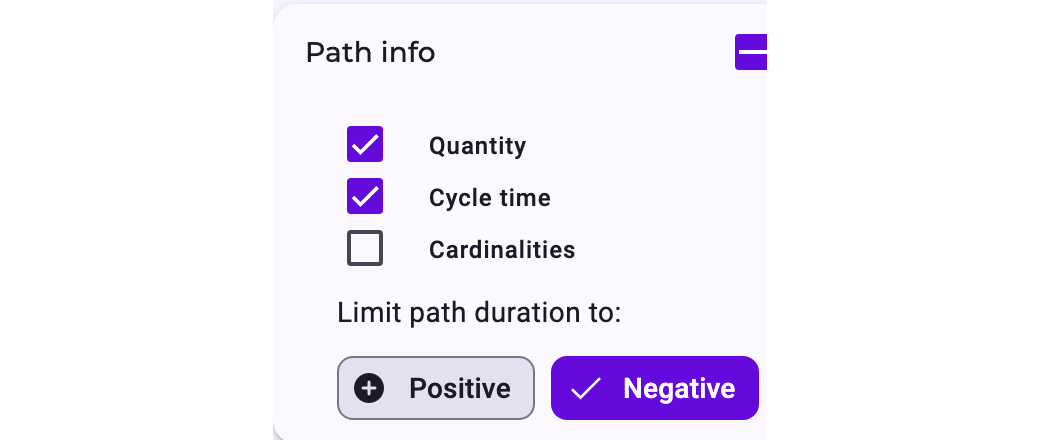
The graph then shows, for each relationship:
- the average of only the positive or only the negative times, marked with ⊕ or ⊖;
- how many executions of the first activity had at least one such time, followed by the total in brackets, for example 119 (1,404); cardinalities likewise;
- relationships without any time of the chosen kind as dashed lines instead of hiding them.
The setting doesn't remove cases, and it doesn't change the details table: Transition time (avg.) there always includes all times.
The setting is not available while violation patterns are shown (Violation patterns: Disarray, Negligence or Rework), and not in the Case view with Instance. The Timeline view has the same choice as Limit durations to:, and the dashboard widget Average activity duration has its own (Account exclusively for positive or negative values?); see Dashboard Widgets.
Why Positive and Negative Don't Add Up to the Total
In the example, 1,404 positive plus 119 negative is more than the 1,404 in total. The reasons:
- One execution, several relationships: the quantity counts executions of the first activity. If one software provisioning leads to several invoice entries, some later and some earlier, it counts under Positive and under Negative, but only once in the total.
- Missing time stamps: a relationship without a start time on one side has no transition duration. It counts in the total but neither as positive nor as negative.
- Simultaneous activities: in the Case details, a second activity that started less than 5 seconds before the first is treated as simultaneous and counts neither as a positive nor as a negative relationship. Differences of 0 seconds or more count as positive there, and so do relationships without a time.