
What Minerva Can Do
Minerva is the AI assistant in Noreja. It answers questions about your processes, explains what it finds and creates files such as Excel tables or slide decks. This page explains how Minerva works, which data it uses, what it can and can't do, and what happens with your data. For how to use the chat, see Chat with Minerva.
What You Can Ask
Ask the way you would ask a colleague who knows your process data. For example:
- How many cases does the Purchase-to-Pay perspective have, and what is the average throughput time?
- Where are the most violations in Purchase-to-Pay, and which activities are skipped most often?
- Compare the variants with rework to the others: how much longer do they take?
- Explain the selected case: why did it take so long? (next to an analyzer tab)
- Create an Excel file with the longest transition durations of last quarter.
- Make a short slide deck with the three most important findings for the process owner.
- How do I share a dashboard with my team? (Minerva searches the Noreja documentation)
How Minerva Works
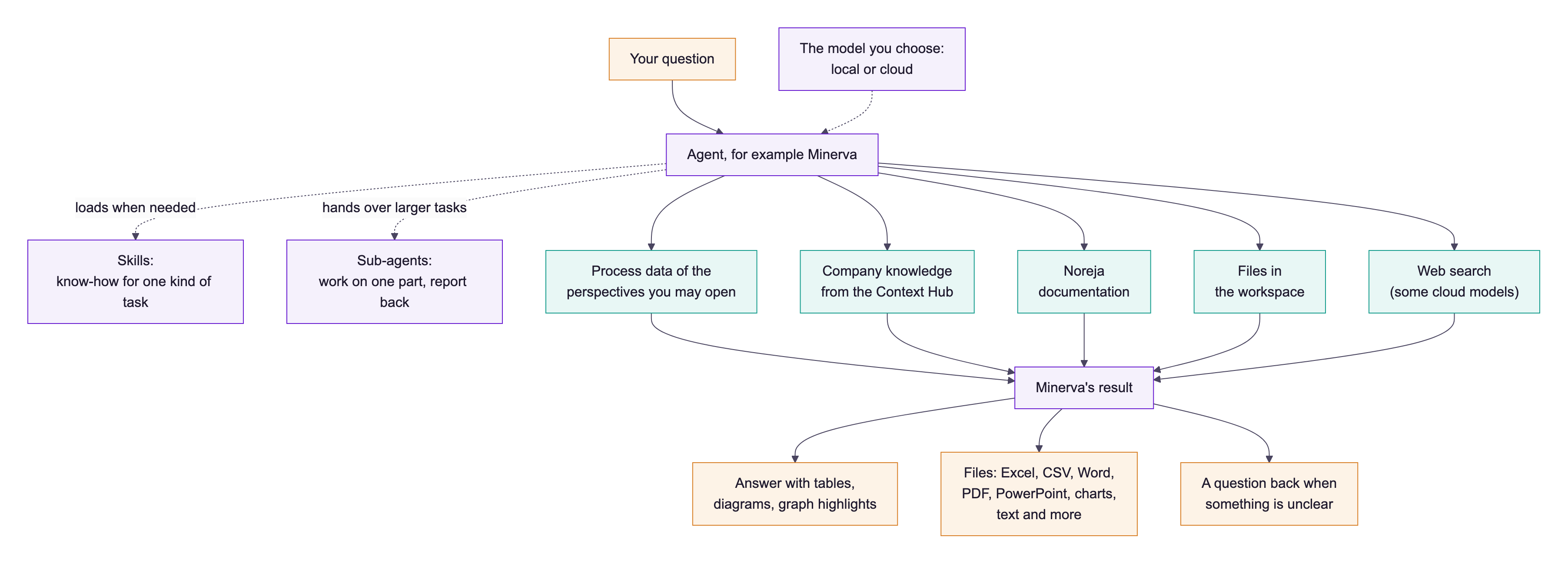
- Agent: the assistant that answers you. Minerva is the standard agent and can use everything described on this page. Your company may set up further agents for special tasks in the AI Hub (see AI Hub: Agents, Skills, Prompts and Workspaces); you choose the agent when you start a chat.
- Plan: for a question with several steps, Minerva first makes a plan and then works through it. You can follow the plan in the chat.
- Skills: written know-how for one kind of task, for example how to calculate rework rates or how to build a slide deck. Minerva has a short list of all skills and loads the full instructions only when your question needs them. Besides Noreja's own skills, your company can add skills (see Write Your Own Skill). You can also pick a skill yourself by typing / in the chat.
- Sub-agents: helpers Minerva hands a part of the work to, for example a detailed analysis of a process graph. They work on their own and report back; several can work at the same time. You see them as separate steps in the chat and can stop them.
- Model: the AI model that does the thinking. You choose it in the chat: a local model, which runs on servers operated by Noreja or, in an on-premise installation, by your company, or an external model from a cloud provider.
Next to Minerva you may see Minerva (On-Premise). It is made for the local model: it reads process data, your company knowledge and the Noreja documentation, but doesn't use sub-agents, doesn't create files, doesn't search the web and doesn't highlight the process graph. Choose a local model with it. See Noreja's Agents and Skills.
Which Data Minerva Uses
- Process data: the perspectives and analyzer tabs you may open yourself, including the ones shared with you. Minerva reads process graphs, cases, variants, key figures, violations and properties of activities. Next to an analyzer tab it can also read the open tab, its filters and the selected element.
- Company knowledge: the context in the Context Hub that you may read, for example process descriptions, policies or explanations of why something happens. Context marked Local LLM is only used with local models. See Context Hub: Knowledge for Minerva.
- Noreja documentation: for questions about how Noreja works.
- Files in the workspace: files you uploaded and files Minerva created earlier, for example CSV, Excel, Word, PowerPoint and PDF files, including scanned PDFs. See Work with Files in Minerva Workspaces.
- The web: with external models from OpenAI and Anthropic, Minerva can search the web when a question needs it.
Minerva doesn't see more than you do. A perspective you can't open doesn't exist for Minerva either.
What Minerva Creates
- Answers: with tables, diagrams and links that highlight activities and relationships in the process graph.
- Files in your workspace: Excel and CSV tables, charts, Word and PDF documents, PowerPoint decks in your company's colours and with its logo, plain text and Markdown files, and many more. Files created by Minerva are marked as AI-generated in the file's properties, and in Markdown and text files at the top.
- Questions back to you: when something is unclear, for example which perspective you mean.
What Minerva Can't Do
- Change anything in Noreja: Minerva only reads process data. It can't import data, edit perspectives, change filters or analyzer tabs, or build dashboards.
- Read dashboards: next to a dashboard, Minerva knows that you're on a dashboard but can't read its widgets. Name the perspective in your question instead.
- Be always right: answers are generated by AI and can contain errors. Check important figures in the Analyzer before you pass them on.
Very large tasks can reach the limit of steps Minerva may take for one answer. Then split the task into smaller questions.
What Happens with Your Data
- Your question and the data Minerva reads for it are sent to the model you chose. With a local model, they stay on servers operated by Noreja or your company. With an external model, they go to the cloud provider.
- Questions and answers from a local model are not sent to external models later in the same chat, unless you release them with a click on the closed lock under the answer. With a click on the open lock, you can also exclude any other question and answer (Exclude question and answer from cloud models).
- Dictation is converted to text by a speech service from OpenAI, whatever model you chose.
- Your chats are personal. Other users, including Customer admins, don't see them in their chat list.
For details on models and data protection, see Minerva: Models, Data Flow and Data Protection.