
Minerva: Models, Data Flow and Data Protection
This page explains which AI models Minerva uses, which data goes to them, and how you keep data away from external AI providers. It's written for administrators and anyone who has to answer data-protection questions about Minerva. How to chat is described in Chat with Minerva.
Which Models Are Available
Below the input field, Model shows the model that answers. The list has two groups:
- Local models: models that run on servers operated by Noreja or, in an on-premise installation, by your company. No AI provider receives the data. Today this is Gemma 4.
- External Models: models from Anthropic, OpenAI and Mistral, called through their interfaces.
Which models your installation offers and which one a new chat starts with are set for your installation by Noreja. A new chat starts with the agent's default model or, if the agent has none, with the installation's default. Admins can give an agent a Default model and limit it to Compatible models in the AI Hub; see AI Hub: Agents, Skills, Prompts and Workspaces. The agent Minerva (On-Premise) is made for the local model and starts with it, but choosing this agent alone doesn't keep data local: check that a local model is selected.
Each user can switch the model during a chat. When you switch from a local to an external model, Noreja warns you first. It doesn't warn when a chat starts on an external model or when you switch between external models. Premium models show Premium model selected because they cost more; see What a Model Costs.
Which Data Goes to the Model
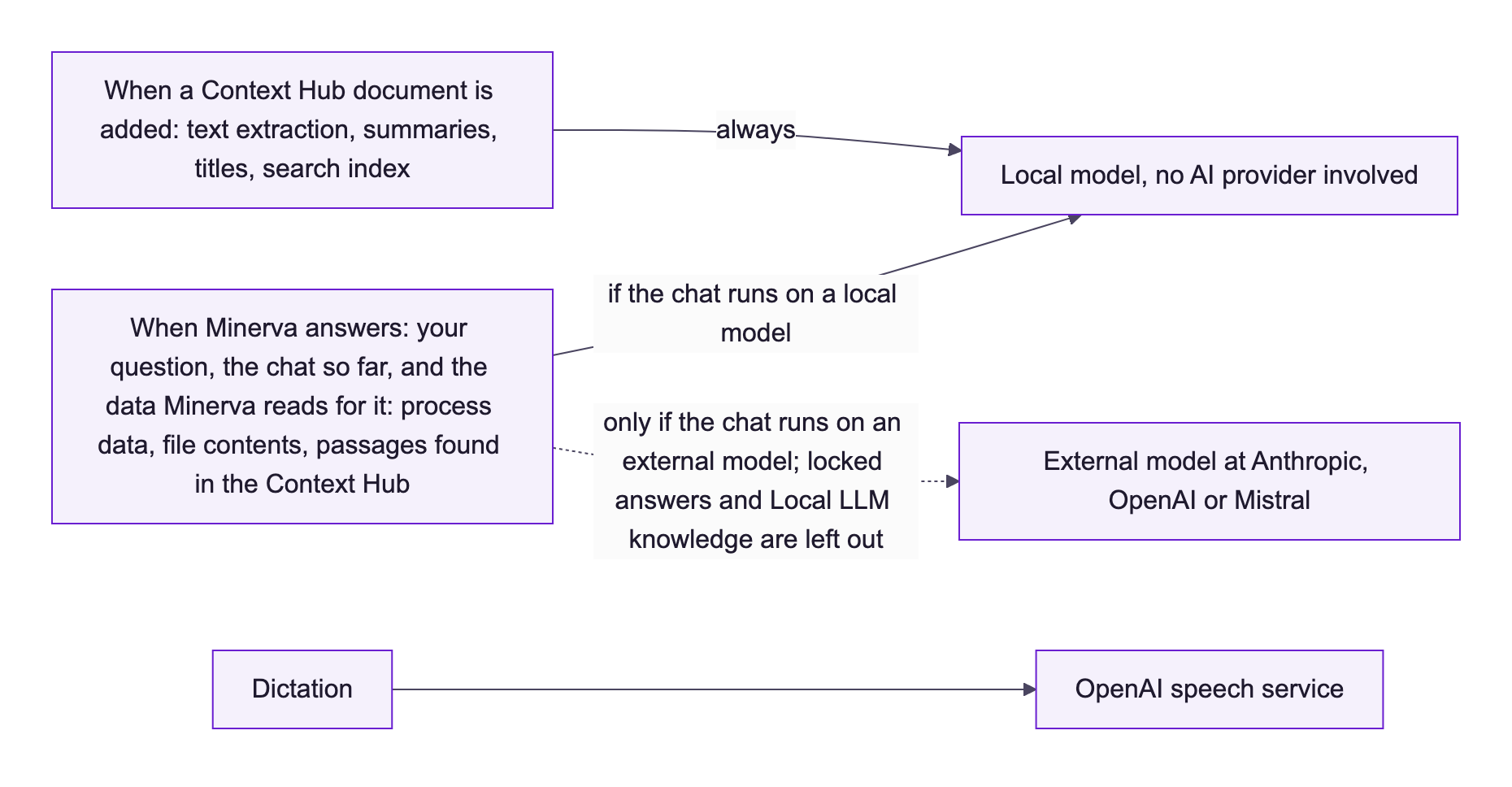
Whichever model answers receives:
- your question and the earlier messages of the chat, or a summary of them when the chat gets long;
- the agent's instructions and the skills it loads;
- the data Minerva reads to answer: process data such as graphs, key figures, variants and cases; the open analyzer tab with its filters; file contents from workspaces;
- the passages Minerva finds in the Context Hub, such as text sections and chapter summaries of your company's documents. With an external model, items marked Local LLM are left out of the search, so their passages never reach the provider;
- web search results, if the model searches the web (OpenAI and Anthropic models only).
Minerva reads with your permissions: it only sees perspectives, tabs and knowledge you may open. It only reads process data and can't change it; it writes files only in workspaces.
Chat titles and chat summaries are created by the chat's own model. Preparing a Context Hub document when it is added always runs on the local model: its text extraction, summaries, titles and search index never go to an external provider. Only the passages Minerva finds while answering can reach an external model, as described above.
Dictation is the exception: speech is converted to text by a speech service from OpenAI, whatever model the chat uses. If recordings must not leave your company, type instead.
Keep Data Away from External Models
- Use a local model: for confidential questions. Answers from a local model are marked automatically: later requests in the same chat on an external model leave them out.
- Lock an answer: a click on the open lock under an answer (Exclude question and answer from cloud models) keeps that question and answer out of later requests on external models. The question then shows Local models only and the lock is closed; a click on the closed lock (Remove exclusion – release to cloud models again) releases it. See Chat with Minerva.
- Company knowledge: Context Hub items with Never allow access to public LLMs? (shown as Local LLM) are only used when a local model answers. If an item is marked this way later, answers that already used it are locked automatically. See Context Hub: Knowledge for Minerva.
These controls apply to future requests. What an external model has already received can't be taken back.
Where Data Is Stored, and for How Long
- Chats are stored in Noreja and listed only for the person who created them. They stay until the user deletes them; Noreja deletes nothing automatically.
- When a chat is deleted, its messages are removed. The token usage of the chat (model, number of tokens, cost) is kept, without the text.
- Workspace files stay until they are deleted; deleting a chat doesn't delete its files. See Work with Files in Minerva Workspaces.
- How long an external provider keeps requests depends on Noreja's agreements with the provider. Ask Noreja for the details, or see the Trust Center (gear icon Settings → Trust Center under Information; see System Information and Trust Center).
AI-Generated Content
- Every answer shows AI-generated · results may contain errors below the input field. Check important results before you base decisions on them.
- Files Minerva creates or edits carry a machine-readable note that they were generated by an AI system. Uploaded files aren't marked.
- Summaries and titles in the Context Hub are marked as created by AI.