
Tutorial P2P Expert - Delay and Loss of Discount
TL;DR
Goal: Transfer delays from the goods-receipt inspection to downstream invoices and payments, and calculate the resulting lost cash discount.
Prerequisites: The capacity bottleneck onwareneingang_pruefungis configured and generates a backlog.
Result: Delayed inspections shift the associated invoices and payments.skonto_frist_amstays fixed; if it is exceeded,skonto_genutztandskonto_verlust_eurare recalculated.
The business question
In the previous use case we generated a local bottleneck:
Wareneingang
→ limited inspection capacity
→ backlog
→ delayed wareneingang_pruefung
For now, however, only the inspection itself is delayed.
In a real P2P process, such a delay often carries further:
An invoice can be approved later, the payment shifts and an existing cash-discount deadline can be missed.
The actual business question is therefore:
What financial effects can an operational capacity bottleneck in goods receipt have on later process steps?
Desired data picture
Without a bottleneck:
Wareneingang
→ Wareneingangsprüfung
→ Rechnung
→ Rechnungsfreigabe
→ Zahlung
→ cash-discount deadline met
With a bottleneck:
Wareneingang
→ backlog in the inspection
→ delayed Wareneingangsprüfung
→ invoice shifts
→ payment shifts
→ skonto_frist_am is exceeded
→ cash discount is lost
This creates an end-to-end causal chain:
Kapazitätsengpass
→ Prozessverzögerung
→ verspätete Zahlung
→ finanzieller Verlust
1. Opening the Advanced area
Stay under: 07 Capacity Bottleneck and open: Advanced
There we find the section: 5. Propagate the delay
Here, the Smart Data Forge can transfer a delay that arose from the backlog to downstream objects of the same case. As soon as the necessary fields are set, the propagation is active; there is no separate on/off switch.
2. Passing the delay on via rechnung_bezug
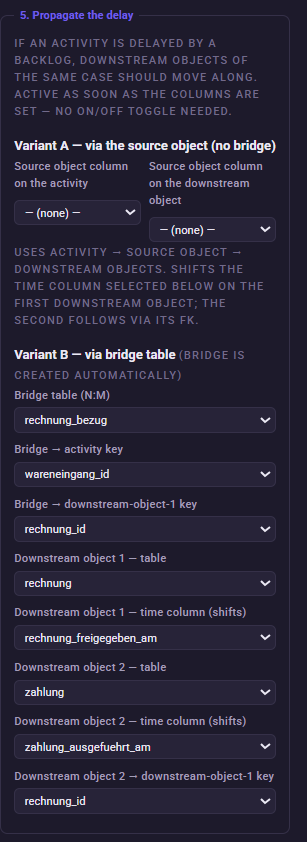
For our P2P model we use: Variant B — via bridge table
The reason for this is the relational structure.
Between goods receipt and invoice, the table exists: rechnung_bezug
It connects: wareneingang with: rechnung
and thereby enables the assignment of the inspection delay that arose to the correct invoice.
Configure:
Bridge table (N:M): rechnung_bezug
Bridge → activity key: wareneingang_id
Bridge → downstream-object-1 key: rechnung_id
The prepared Expert configuration uses exactly this bridge-based propagation.
3. Configuring the invoice as the first downstream object
Set:
Downstream object 1 — table: rechnung
Downstream object 1 — time column (shifts): rechnung_freigegeben_am
This way the Forge knows the invoice that is affected by the delayed inspection.
With the bridge variant, the engine goes one step further: it takes the calculated inspection delay for the associated invoice and shifts its timestamps by the same period. This preserves the relative gaps within the invoice.
In simplified form:
Inspection originally: Dienstag
Inspection due to backlog: Donnerstag
→ delay: about 2 days
Then the associated invoice also shifts back accordingly.
4. Configuring the payment as the second downstream object
Then set:
Downstream object 2 — table: zahlung
Downstream object 2 — time column (shifts): zahlung_ausgefuehrt_am
Downstream object 2 → downstream-object-1 key: rechnung_id
This transfers the same delay to the payment as well.
The engine shifts the payment by the same calculated time offset as the associated invoice.
The causal chain now reads:
wareneingang_pruefung
→ delay
→ rechnung
→ same delay
→ zahlung
Why is the same delay passed on?
Suppose an inspection is delayed by three days due to the backlog.
Without propagation, an invoice could nevertheless subsequently exist at the originally planned time.
That would be causally implausible: Prüfung verspätet
but: Rechnung unverändert früh
With delay propagation, the delay that actually arose is therefore carried forward.
From:
+3 Tage bei der Prüfung
become also:
+3 Tage bei den nachgelagerten Objekten.
This keeps the process temporally consistent.
5. Treating the cash-discount deadline as a fixed deadline
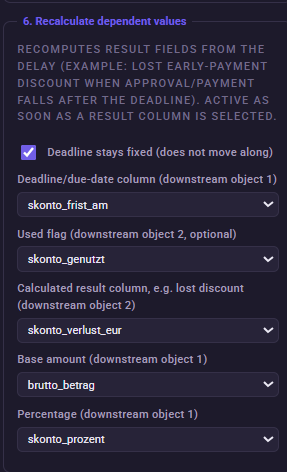
Now we open:
6. Recalculate dependent values
This area recalculates values that result from the previously generated delay.
Enable: Deadline stays fixed (does not move along)
and choose as the:
Deadline/due-date column (downstream object 1): skonto_frist_am
The invoice and payment should shift due to the bottleneck.
The original cash-discount deadline, by contrast, remains in place.
The engine therefore explicitly exempts skonto_frist_am from the timestamp shift when the deadline is configured as fixed.
In business terms, this yields: skonto_frist_am remains unchanged
while: zahlung_ausgefuehrt_am is shifted back.
Only this way can an actual cash-discount loss arise.
6. Configuring the result fields for the cash discount
Set:
Used flag (downstream object 2, optional): skonto_genutzt
Calculated result column, e.g. lost discount (downstream object 2): skonto_verlust_eur
Base amount (downstream object 1): brutto_betrag
Percentage (downstream object 1): skonto_prozent
The Expert configuration uses exactly these fields together with the fixed skonto_frist_am.
When is the cash discount considered lost?
After the delay propagation, the Forge checks whether:
rechnung_freigegeben_am > skonto_frist_am
or:
zahlung_ausgefuehrt_am > skonto_frist_am
holds.
If at least one of these conditions is met:
skonto_genutzt = nein is set.
Additionally, the Forge calculates:
skonto_verlust_eur = brutto_betrag × skonto_prozent / 100
The calculation is a direct part of the generated capacity SQL.
The difference from the Simple use case
In the Simple part we deliberately modeled a fixed delay:
pruefer_team = Kreditorenbuchhaltung
→ +12 Tage
→ increased cash-discount risk.
That was a directly defined cause.
In the Expert use case, by contrast, the delay arises dynamically:
zu viele Wareneingänge
→ zu wenig Prüfkapazität
→ Backlog
→ actual inspection delay
→ delay propagation
→ delayed payment
→ cash-discount loss.
The financial effect thereby no longer depends on a fixed set delay alone, but on the actual utilization of the resource.
The finished configuration
5. Propagate the delay
| Setting | Value |
|---|---|
| Variant | Variant B — via bridge table |
| Bridge table | rechnung_bezug |
| Bridge → activity key | wareneingang_id |
| Bridge → downstream-object-1 key | rechnung_id |
| Downstream object 1 | rechnung |
| Time column | rechnung_freigegeben_am |
| Downstream object 2 | zahlung |
| Time column | zahlung_ausgefuehrt_am |
| Downstream 2 → downstream 1 key | rechnung_id |
6. Recalculate dependent values
| Setting | Value |
|---|---|
| Deadline stays fixed | enabled |
| Deadline | skonto_frist_am |
| Used flag | skonto_genutzt |
| Calculated result | skonto_verlust_eur |
| Base amount | brutto_betrag |
| Percentage | skonto_prozent |
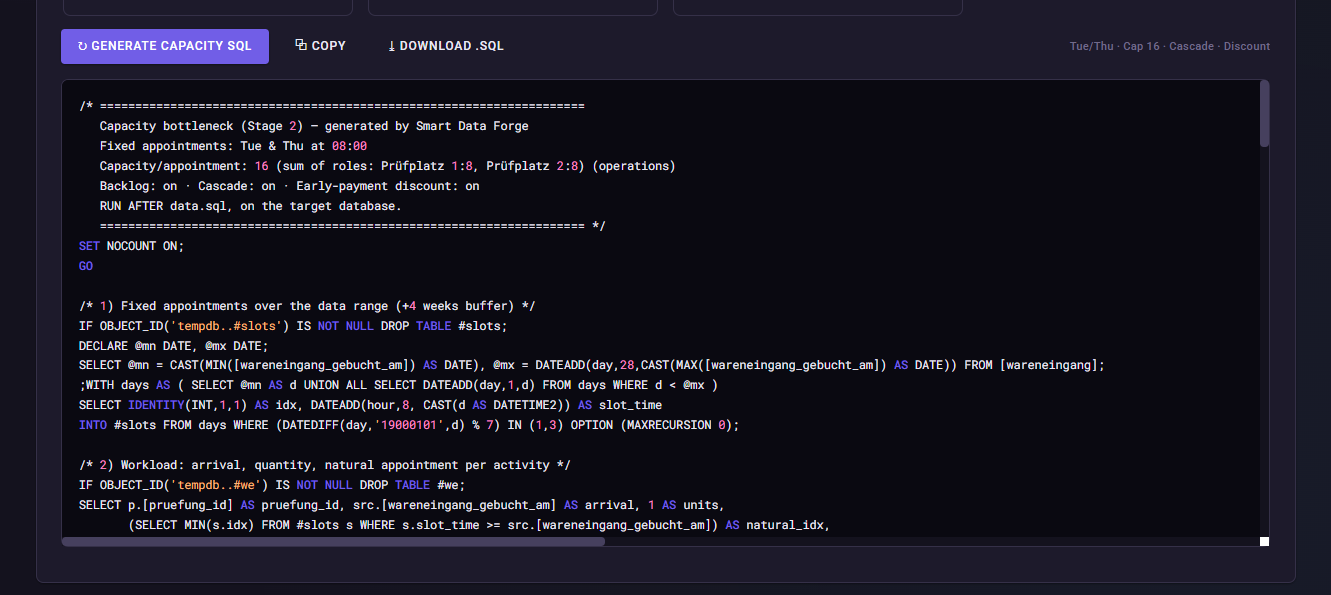
Generating the capacity SQL again
After the extension, we click again on:
Generate capacity SQL
The generated script now no longer contains only the capacity and backlog logic.
It additionally contains:
1. shifting of the goods-receipt inspection
2. propagation to the associated invoice
3. propagation to the payment
4. checking of the fixed cash-discount deadline
5. calculation of the lost cash discount.
The entire Expert logic is thereby executed in a downstream capacity SQL.
What should I later see in Noreja?
Now the bottleneck becomes visible not only locally at the goods-receipt inspection.
An end-to-end chain of effects should arise:
pruefkapazitaet_ueberschritten = 1
→ higher verzoegerung_slots
→ later invoice
→ later payment
→ more often skonto_genutzt = nein
→ positive skonto_verlust_eur.
This allows investigating, for example, the following questions:
Which process cause leads to lost cash-discount amounts?
How much cash discount is lost in cases with inspection-station backlog?
How strongly does the bottleneck influence the entire P2P cycle time?
Are cases with several postponed inspection appointments particularly expensive?
The decisive point is:
We did not distribute the financial loss randomly across cases.
It is a causal consequence of the previously generated process bottleneck.
Common mistakes / things to watch out for
Enable Deadline stays fixed.
If the cash-discount deadline is shifted along with the invoice, the desired financial effect disappears.
Use the correct bridge. rechnung_bezug connects goods receipt and invoice and thereby enables the assignment of the individual delay.
Do not generate the cash-discount loss directly at random. skonto_verlust_eur should arise from the actual deadline overrun.
Execute the capacity SQL after data.sql.
Capacity, backlog, propagation and cash-discount recalculation are part of the downstream SQL step.
Result
We have now generated a complete synthetic cause-and-effect chain:
begrenzte Prüfkapazität
→ Backlog
→ verspätete Wareneingangsprüfung
→ verspätete Rechnung
→ verspätete Zahlung
→ Skontofrist überschritten
→ Skontoverlust in EUR.
With this, the Expert Mode shows how a measurable financial effect can arise from an operational process problem.
Next step
In the last Expert use case, we model a different mechanism:
Several invoices are not processed individually right away, but collected in a regular common run.
For this we use:
08 Bundling
and generate a:
weekly approval run on Friday at 09:00.