
Tutorial P2P Expert - XOR; Different Sourcing Methods
TL;DR
Goal: Generate different procurement paths for physical materials and software after the order line item.
Prerequisites:Config 2 – Simpleis in place and the previous Simple use cases are configured.
Result: Physical procurements run through delivery, goods acceptance and goods receipt, while software is provisioned directly.
The business question
Not every order runs through the same procurement process.
A physical component, for example, has to be:
geliefert
→ angenommen
→ gebucht
→ geprüft
.
With a software license, by contrast, there is no classic goods receipt.
The corresponding sequence can be considerably shorter:
Bestellposition
→ Bereitstellung
A central process mining question is therefore:
How do cycle times and process patterns differ between various procurement types?
Desired data picture
After the: bestellposition
an XOR decision between two process paths should take place.
Physical procurement
Bestellposition
→ Lieferung
→ Warenannahme
→ Wareneingang
→ Wareneingangsprüfung
→ Rechnung
Software procurement
Bestellposition
→ Bereitstellung
→ Rechnung
After that, both variants continue again in the common invoice and payment process.
1. Switching to Mode: Expert
Set the Smart Data Forge to:
Mode: Expert
This makes the following areas additionally available later:
07 Capacity Bottleneck
and
08 Bundling
.
The actual branch logic is still modeled in:
03 Causal Chain
.
2. Creating additional tables
For the two procurement paths, we extend the Simple model with the following tables:
lieferung
Primary Key: lieferung_id
Timestamp: geliefert_am
Foreign Key: bestellposition_id → bestellposition.position_id
warenannahme
Primary Key: warenannahme_id
Timestamp: angenommen_am
Foreign Key: lieferung_id → lieferung.lieferung_id
bereitstellung
Primary Key: bereitstellung_id
Timestamp: bereitgestellt_am
Foreign Key: bestellposition_id → bestellposition.position_id
wareneingang_pruefung
Primary Key: pruefung_id
Timestamps: pruefung_geplant_am, wareneingang_geprueft_am
Foreign Key: wareneingang_id → wareneingang.wareneingang_id
These tables represent the business differences between a physical and a digital procurement process.
3. Building the PHYSICAL path
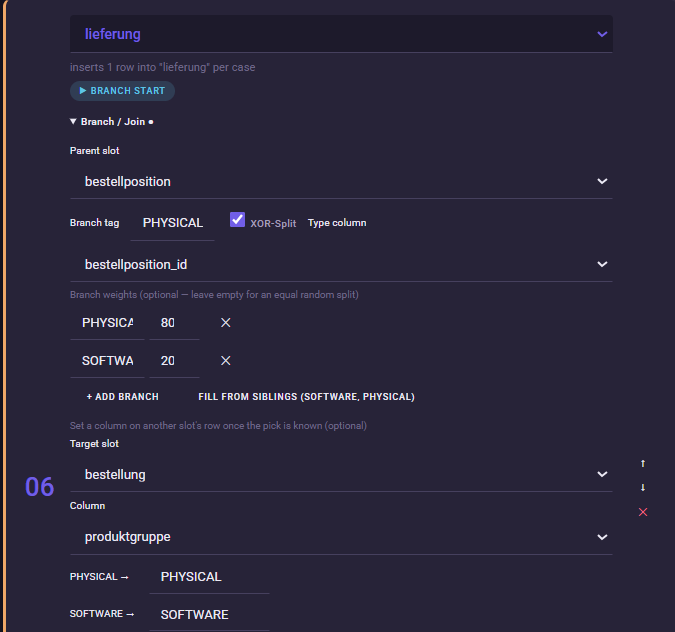
Open: 03 Causal Chain
After: bestellposition
we first insert: lieferung.
Then, on lieferung, open: Branch / Join and configure:
Parent slot: bestellposition
Branch tag: PHYSICAL
Additionally enable:
XOR-Split
This makes lieferung the starting point of the decision between physical procurement and software.
4. Configuring the branch weighting
For our demo we use:
PHYSICAL = 80
SOFTWARE = 20
This way, roughly 80% of the corresponding cases run through the physical process and 20% through the software path.
For this, the Smart Data Forge supports weighted XOR branches directly in the Causal Chain.
5. Adding the physical process chain
After lieferung we add:
warenannahme
→ wareneingang
→ wareneingang_pruefung
All these slots belong to the:
PHYSICAL
branch.
The time gaps used in the Expert model are:
| Transition | Time |
|---|---|
bestellposition → lieferung | 2–10 days |
lieferung → warenannahme | 0–1 day |
warenannahme → wareneingang | 1–6 hours |
wareneingang → wareneingang_pruefung | 0–2 days |
This creates a realistic physical material flow from the order through to the quality inspection.
6. Adding the SOFTWARE path
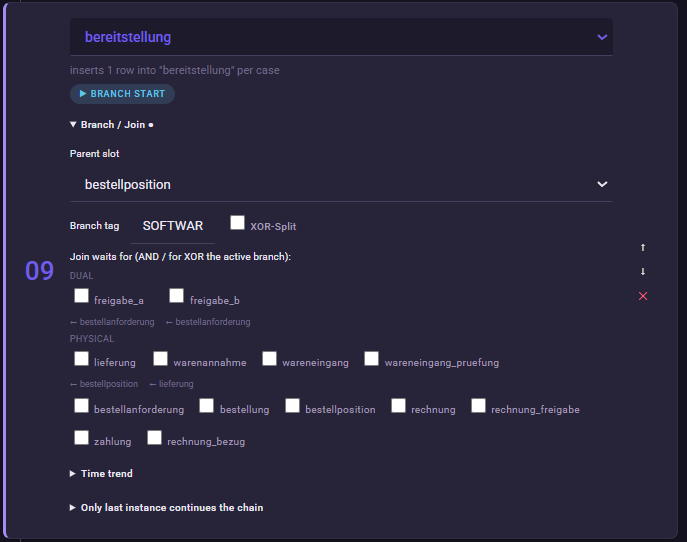
As the second branch we add: bereitstellung.
Configure:
Parent slot: bestellposition
Branch tag: SOFTWARE
The software path is thereby considerably shorter:
Bestellposition
→ Bereitstellung
For the provisioning we use a gap of: 0–4 hours
This simulates, for example, the provisioning of a license or a digital access.
How does the Forge decide between the two paths?
The XOR decision is made before the actual case generation.
For a case it is therefore unambiguously determined which branch is active.
Only the slots of the chosen branch are generated. The slots of the other branch are missing for this case.
A case thereby has either:
lieferung / warenannahme / wareneingang / wareneingang_pruefung
or:
bereitstellung
but not both paths at the same time.
Making the procurement type visible in the data too
In the Expert demo, the XOR decision that was made is additionally transferred to a business attribute.
For this, bestellung.produktgruppe is set to: PHYSICAL
or: SOFTWARE.
For this, the Smart Data Forge supports, on an XOR split, writing the selected branch value onto an already-generated record.
This later allows recognizing which procurement type the case belongs to not only from the process path, but also via an attribute.
Materials matching the branch
In the prepared Expert data set, it is additionally ensured that the selected materials match the respective process path.
Examples:
PHYSICAL
Steuerungsmodul, Kabelsatz, Gehäuse, Sensor
SOFTWARE
Standardlizenz,, Wartungsvertrag
This is meant to prevent, for example, a Standardlizenz from running through a physical goods-receipt process.
This assignment is already contained in the prepared Expert configuration and does not have to be built manually for the training.
What should I later see in Noreja?
In process mining, two clearly different regular variants should now become visible.
Physical path
Bestellposition
→ Lieferung
→ Warenannahme
→ Wareneingang
→ Wareneingangsprüfung
Software path
Bestellposition
→ Bereitstellung
Interesting analysis questions are, for example:
Which procurement type has the longer cycle time?
At which point does the most waiting time arise in physical orders?
How strongly do software and material procurement differ in the process?
The important point is:
These differences are not deviations.
Both paths are regular process variants of our P2P model.
Process variant vs. deviation
The previous Simple use cases deliberately generated anomalies.
For example:
Maverick Buying
Rework
Wrong Order
With:
PHYSICAL
and:
SOFTWARE
by contrast, these are business-intended variants.
This is important for the later process mining analysis:
Not every differing variant is automatically a process problem.
Common mistakes / things to watch out for
Start both paths from the same starting point.
Both lieferung and bereitstellung refer to bestellposition.
Use consistent branch tags.
The physical path receives PHYSICAL throughout, the software path SOFTWARE.
Use XOR instead of AND.
A case should run through exactly one of the two procurement paths.
Do not interpret variants as a deviation.
PHYSICAL and SOFTWARE are regular business process variants.
Result
Our P2P model so far now has two regular procurement paths:
PHYSICAL
→ longer logistical process with delivery and goods receipt.
SOFTWARE
→ short digital provisioning.
With this, we can for the first time investigate how different business process paths influence the later cycle time.
Next step
In the next Expert use case, we concentrate on the physical path.
There, with:
wareneingang_pruefung
we introduce an activity whose processing capacity is limited.
Building on this, we generate a real:
Capacity bottleneck with backlog.