Deep Dive: Timestamp Formatting
Timestamp Formatting in the Database
Our system internally uses the standardized ISO 8601 format for timestamps. This format looks like the following: 2025-07-23T15:24:00Z.
To ensure reliable processing, it's important that all timestamps are correctly formatted and can be clearly interpreted.
Why is formatting necessary?
In some cases, timestamps in the source data appear in unusual or incomplete formats. Common examples include:
- Timestamps without separators:
230720251524(instead of2025-07-23T15:24) - Timestamps stored as an incorrect data type (e.g. as a number or string)
- Timestamps without a timezone indicator
To allow our system to correctly parse such values, we provide a free-text input field where you can manually define the appropriate timestamp format.
How does manual formatting work?
You can specify the date format using the Java-compatible syntax – for details on all formatting options, refer to the official documentation. This formatting style provides a flexible and precise way to interpret timestamps.
Here are a few commonly used formatting symbols:
| Symbol | Meaning | Example Value |
|---|---|---|
yyyy | Four-digit year | 2025 |
MM | Two-digit month | 07 |
dd | Two-digit day | 23 |
HH | Hour (24-hour format) | 15 |
mm | Minutes | 24 |
ss | Seconds | 00 |
X | Timezone indicator (e.g. Z) | Z or +02 |
T | Separator between date and time | T in 2025-07-23T15:24 |
Example format:
A timestamp like 230720251524 (representing July 23, 2025 at 15:24) corresponds to the format: ddMMyyyyHHmm
Defining the Timezone
In addition to the format, you can also define a timezone (e.g. Europe/Vienna, UTC, America/New_York) to ensure the timestamp is interpreted correctly – especially if the value itself does not include a timezone component. The timezone can be directly added within the input field or selected via the drop drown element.
Timestamp Transformation in Noreja Builder
During entity configuration, users can transform time information in the second step.
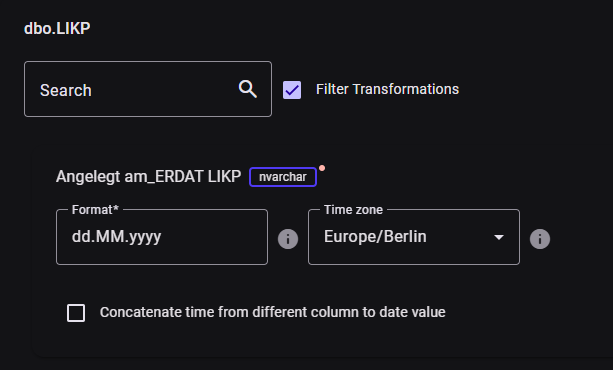
- At date level: If a date is to be generated from a text column, the string must be entered in the “Format” field based on the above explanations. The time specification (i.e., hours, minutes, seconds) is omitted. Then, a time zone is selected in which the original date is located.
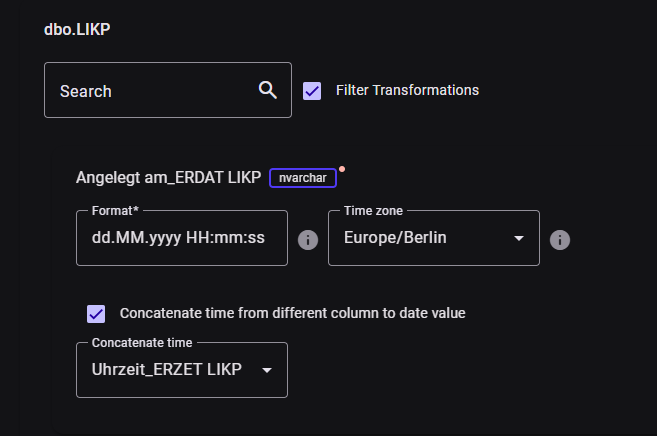
- At timestamp level: If a time specification from another column is to be added to the date specification (often the case in SAP systems, for example), the “Concatenate time” checkbox must be selected. The column name with the time is then selected and the formatting string is supplemented with hours, minutes, and seconds.