
Perspective Modelling Best Practices
A perspective's expected order decides what Noreja reports as normal and what as a deviation. This page collects what works when you model it, with the typical mistakes. How to build a perspective step by step is in Create a Perspective; the ideas behind shortcuts and backjumps are in The Expected Order: Perspective Hypothesis, Shortcuts and Backjumps.
1. Draw the Happy Path with Normal Relationships
Start with the route a case takes when everything goes as planned, for example: order created, item created, goods received, invoice entered, invoice released, payment. Connect these activities with normal relationships, each to the activity expected next. Everything else builds on this path.
2. Mark Optional Steps with a Shortcut
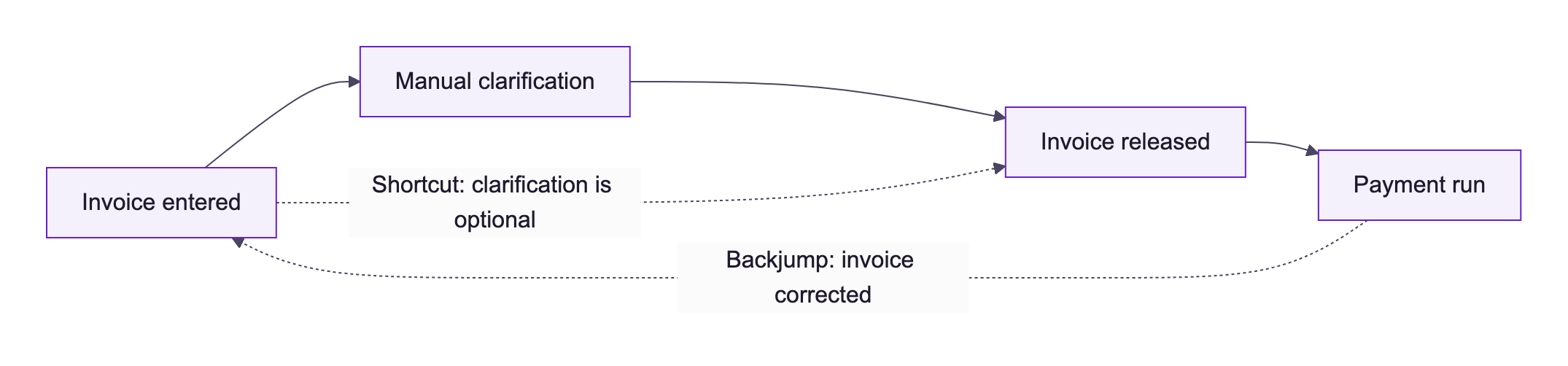
If a step is allowed to be skipped, keep it on the happy path and add a relationship around it, marked as Shortcut. Cases that take it then count as an allowed simplification, not as a skipped step. For example, a manual clarification that only some invoices need can be bypassed this way.
3. Mark Allowed Repetitions with a Backjump
If going back is part of the process, for example correcting an invoice after a check, draw the relationship back to the earlier activity and mark it as Backjump. As soon as you mark any relationship as a shortcut or backjump, every loop in the expected order needs such a relationship; otherwise the import stops and asks you to mark one.
4. Mark All Shortcuts and Backjumps
As long as no relationship is marked, Noreja guesses shortcuts and backjumps during the import. As soon as one relationship is marked, only marked relationships count. So mark every relationship you mean as a shortcut or a backjump, and check the others when you add one.
5. Use Several Outgoing Relationships Only for Steps That All Happen
An activity can lead to several activities, for example an order that leads to its items and to its invoice. Several outgoing relationships mean that every branch is expected for every case; a case that leaves one out counts as a skipped step (Negligence). There is no "either – or" between branches. Where only one of several activities is expected, for example hardware or software items, draw the alternative as a direct relationship around the activity and mark it as Shortcut. See The Expected Order: Perspective Hypothesis, Shortcuts and Backjumps.
6. Choose the Case ID on the Right Level
- What one case is: the case ID decides it. Choose the activity that stands for the business object you want to follow, usually the document at the start, such as the order.
- Level: with the order as case, all items of an order belong to one case; with the item as case, each item is a case of its own, and the order appears in every item's case.
- Several columns: if the identifier has several columns, choose with care which of them define a case; fewer columns merge cases.
7. Mark the Expected Starts and Ends
Mark the activities where cases are expected to begin and finish as Start activity and End activity. Activities without incoming or outgoing relationships count as starts and ends as well. Cases that begin or end elsewhere show as unexpected starts or ends, for example orders that stop after "Bestellung erstellt".
8. One Question per Perspective
Add only the activities a question needs. A perspective with every object of the entity is hard to read. Several perspectives can use the same entity, each with its own selection of activities, for example one for the whole purchasing process and one for invoice processing only.
9. Check the Result after the Import
After the first import, use Show violations in the builder: it shows the steps cases actually took that the expected order doesn't contain, with how often. Frequent ones can mean that the process really runs differently, or that the expected order lacks a relationship. Right-click such a step to add it as a normal relationship, a backjump or a shortcut. In the Analyzer, look at the process patterns: see Process Patterns: Disarray, Negligence, Rework and Allowed Deviations.
Typical Mistakes
Mistake | What happens | Fix |
|---|---|---|
No case ID | The summary warns No Case ID set. The import will fail., and the import fails. | Right-click the case activity and choose Case ID. |
Activities without relationships, or separate groups | The import fails because the expected order isn't connected. Activities without relationships show a red exclamation mark. | Connect every activity to the rest. |
A loop without a backjump, while other relationships are marked | The import fails and names the activities of the loop. | Mark one relationship of the loop as Backjump. |
Optional steps as normal relationships | Cases that skip them count as skipped steps (Negligence). | Add a shortcut around the step. |
Some shortcuts marked, others not | Unmarked skips count as normal routes or deviations, depending on the relationships. | Mark all shortcuts and backjumps. |
Related
- Create a Perspective
- The Expected Order: Perspective Hypothesis, Shortcuts and Backjumps
- Process Patterns: Disarray, Negligence, Rework and Allowed Deviations
- Import Entities and Perspectives: Status and Errors