
Entities Explained
An entity tells Noreja how the tables of a data source fit together: which rows are events of the process, when they happened, and which rows of different tables belong together. The data specialist sets up an entity once; process analysts then build perspectives on top of it without needing to know the tables. This page explains what an entity consists of, with the Purchase-to-Pay example. Older material calls entities "entity-graph"; it's the same thing.
From Data Source to Perspective
In the Builder, the three menu items build on each other:
- Sources: the connection to a database or system, for example the data source "Demo" with the purchasing tables.
- Entities: which tables are used, as which events, and how they are connected. Each entity belongs to exactly one data source, which can't be changed later. A data source can have several entities.
- Perspective: the view on a process, built on an entity, with the expected order of the activities. Each perspective uses one entity; one entity can carry several perspectives, and each of them uses only the activities it needs. A perspective on invoice processing, for example, can leave out the order activities that a perspective on the whole purchasing process includes.
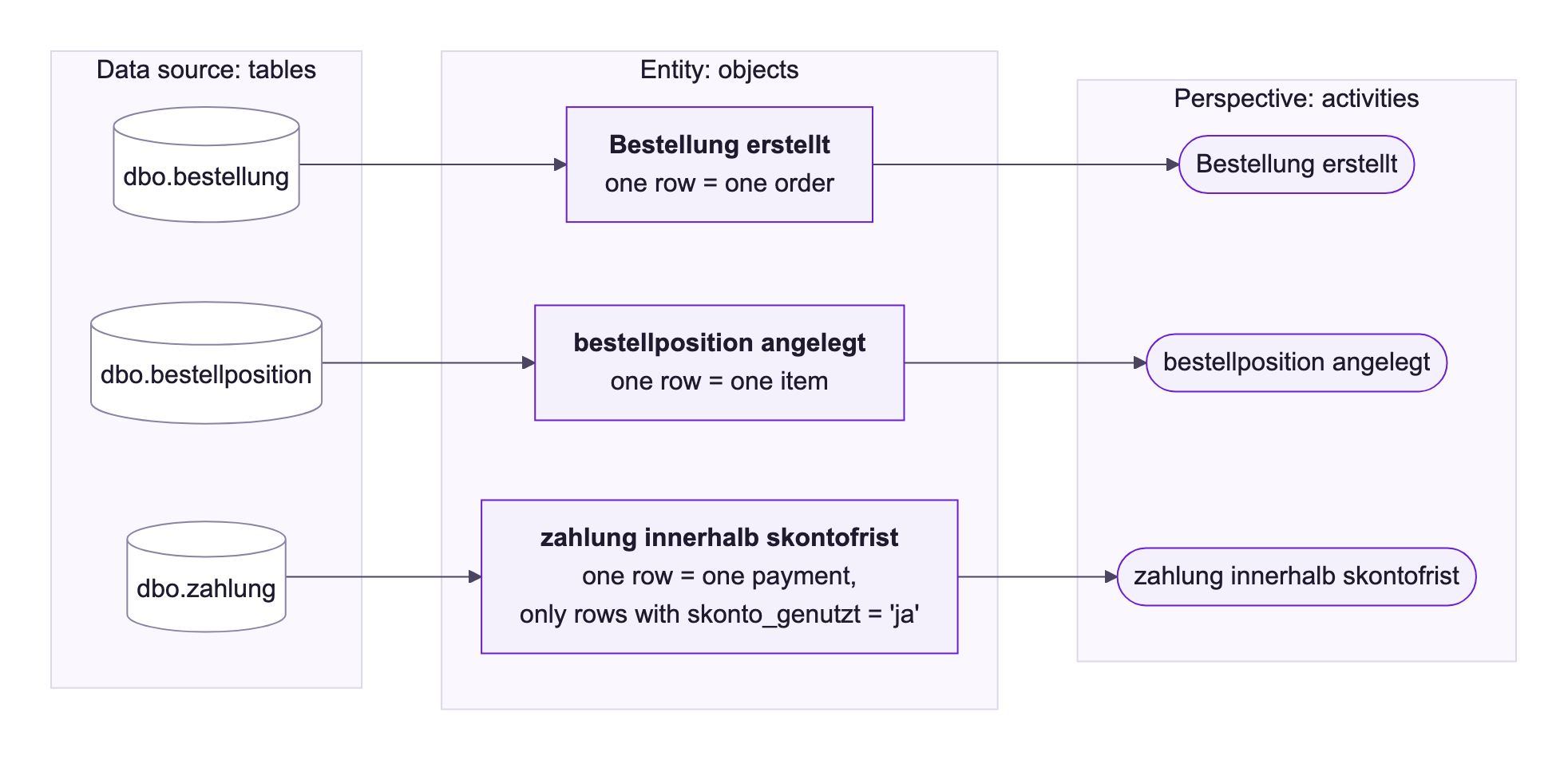
The Purchase-to-Pay entity uses the tables of the data source "Demo". It has 24 objects, linked by 23 data connections:
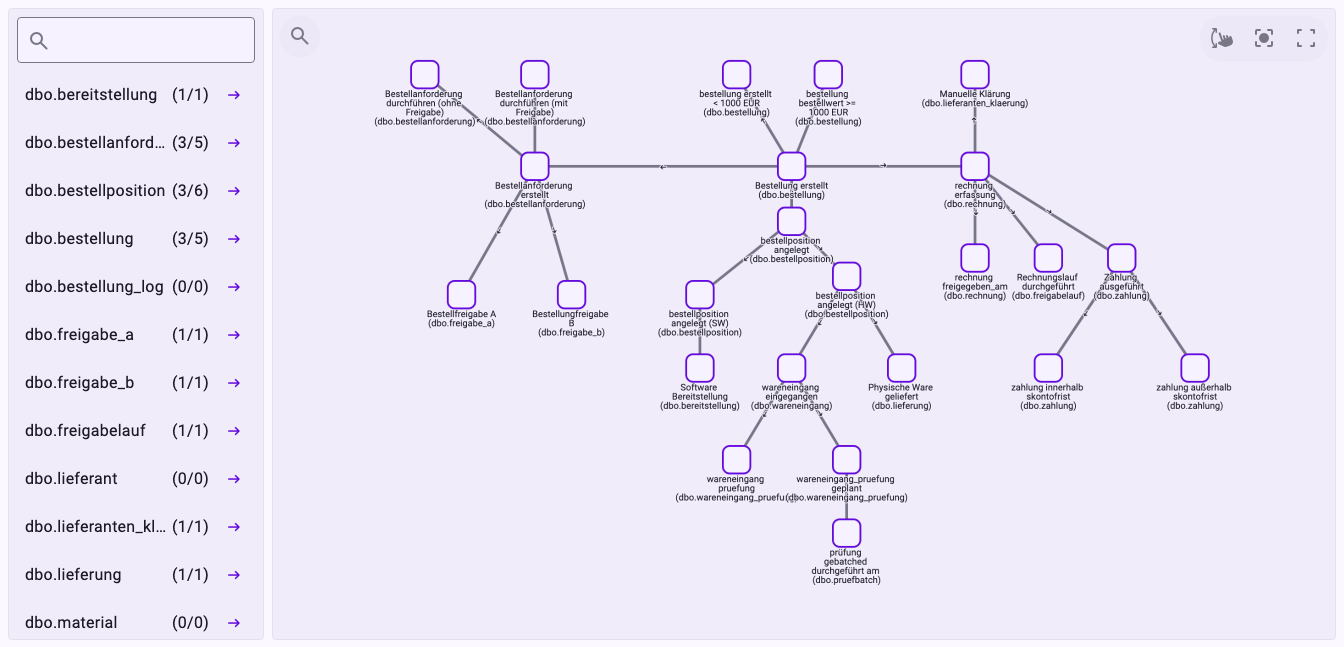
Objects: One Kind of Event
An object is a table of the data source that you place in the entity. It describes one kind of event, and each object becomes one activity: in perspectives and in the Analyzer it appears under its Activity name. Every row the object reads is one execution of that activity, with its own time stamp.
A table can be used for several objects, each reading only some of its rows. In Purchase-to-Pay, the payment table dbo.zahlung gives three objects: "Zahlung ausgeführt", "zahlung innerhalb skontofrist" and "zahlung außerhalb skontofrist". "zahlung innerhalb skontofrist", for example, reads only the payments made within the discount period. In the list of tables, the numbers after each table show how often it is used: dbo.bestellung (3/5) is used by three objects, which have five data connections between them and to other objects.
Right-click an object and choose Configure to open its settings (Configure object):
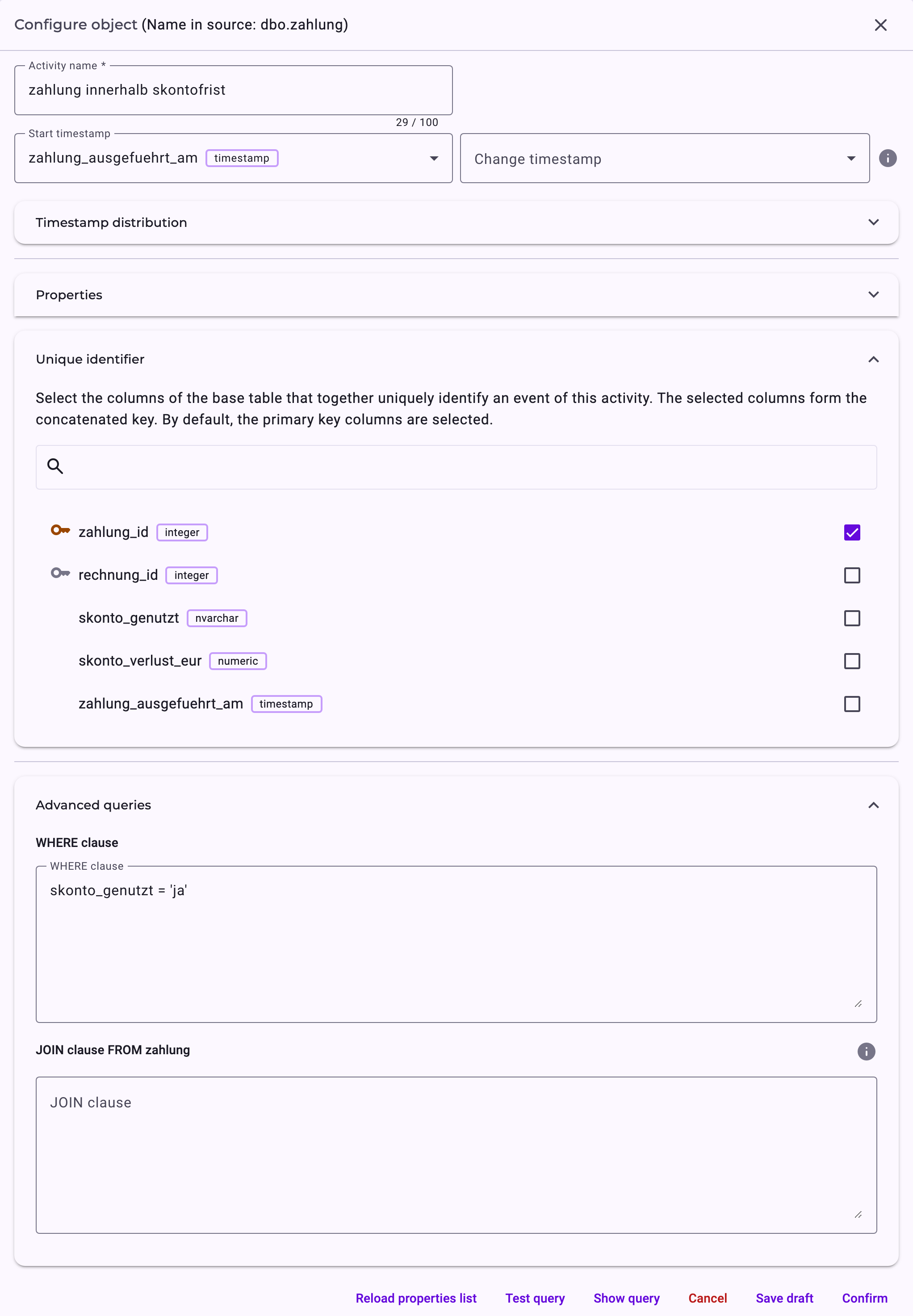
Setting | What it does |
|---|---|
Activity name | The name of the activity in perspectives and the Analyzer. It must be unique within the entity and can have up to 100 characters. |
Start timestamp | Required: the date and time column that says when the event happened. All times in the Analyzer are calculated from it. |
Change timestamp | Optional: when the event was changed, for example a later correction of an order. It's only used if it lies after the start time stamp. |
Properties | The columns that come along with each execution, for example amounts or a status. They appear in the Analyzer's details and can be used for filters. |
Unique identifier | The columns that together identify one event, by default the table's primary key. If the selected columns don't identify each row uniquely, different events get the same identifier and can't be told apart. |
Advanced queries | The WHERE clause limits which rows the object reads, as for zahlung innerhalb skontofrist above. The JOIN clause adds columns of other tables as properties, for example supplier data to an order. |
An object counts as configured once its query has run without errors: Confirm tests it and saves it, Save draft keeps it unfinished. Unconfigured objects are highlighted on the canvas, and the entity can't be imported until every object is configured. See Configure Objects and Relationships.
The same menu has Context: knowledge about this activity for Minerva, for example what a manual clarification means and when it's needed. See Context Hub: Knowledge for Minerva.
Data Connections: Which Rows Belong Together
A data connection links two objects. It says which rows of the one belong to which rows of the other, by mapping columns with the same value, like a join in a database. Right-click the line between two objects and choose Configure to open Configure data connection:
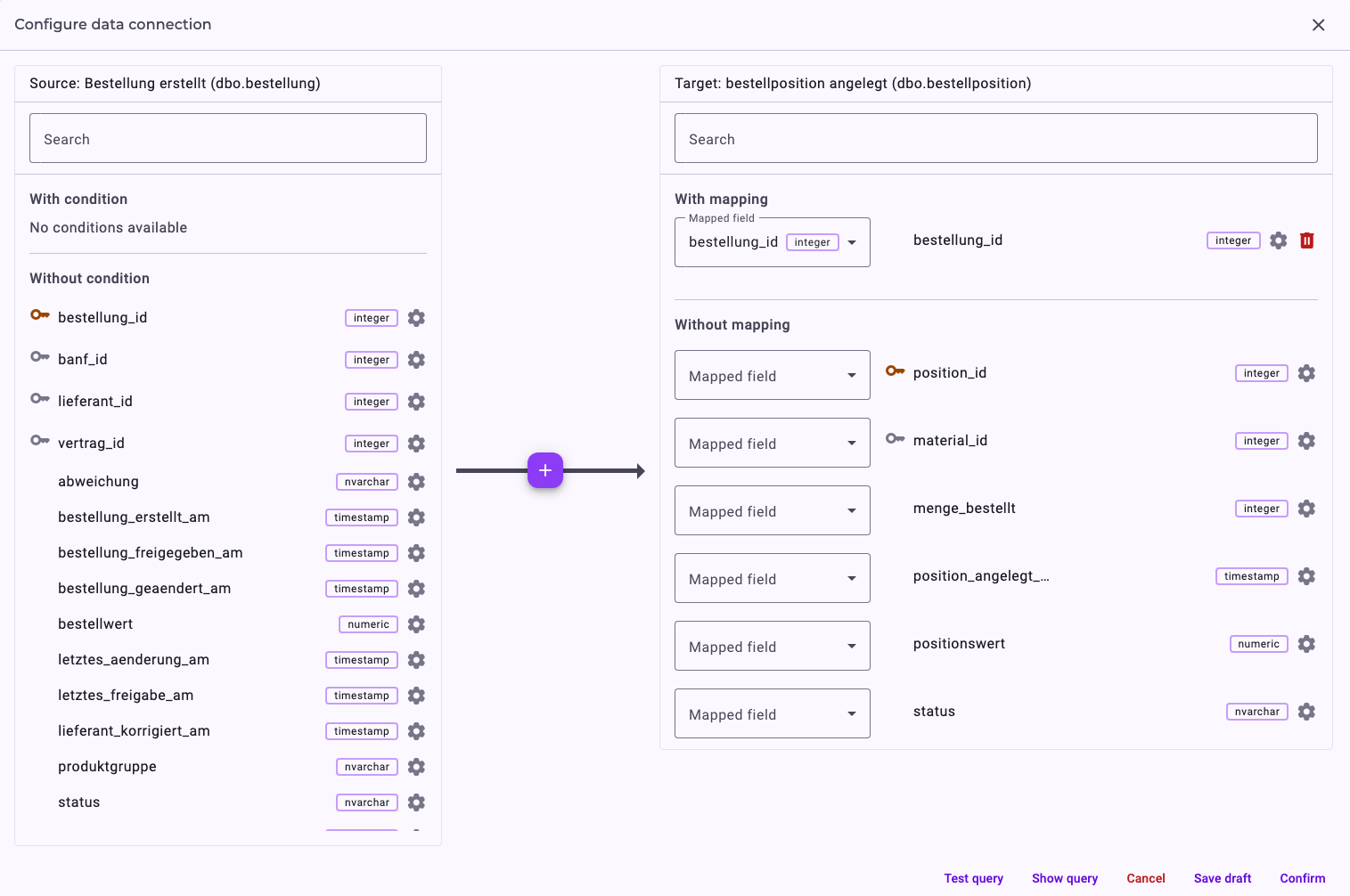
- Mapped field: which column of the one table matches which column of the other. Here, an item belongs to the order with the same bestellung\_id.
- Cross table: a table in between, for tables that have no column in common.
- With condition: an extra condition for the match.
One row can match several rows on the other side: an order with three items is linked to all three. This is where the numbers and cardinalities in the process graph come from; see Quantities and Cardinalities. The direction of the arrow doesn't matter for the process: the expected order of the activities is set in the perspective.
How Cases Come Together
Which rows form one case is decided in the perspective: the process analyst chooses the object whose identifier is the case ID, for example the order; see Create a Perspective. Noreja then collects, for each case, the executions that can be reached from that object along the data connections. That's why every object has to be connected to the others.
What a Valid Entity Needs
- At least two objects.
- All objects connected into one network, without separate groups. Otherwise the import stops with Each entity graph needs to be a connected graph.
- Every object and data connection configured. Otherwise the import names the one that isn't, for example Activity … is not configured.
- For every object, a start time stamp and at least one column in the unique identifier.
We recommend arranging the objects as a star or a tree, as in Purchase-to-Pay: then every object is reached from the case object on exactly one route, which keeps cases easy to follow. Noreja also accepts closed loops of data connections, but the route between two objects is then no longer unique. See Entity Modelling Best Practices.
Own Object or Property?
Make a table its own object if it records an event with its own time stamp, such as an order, a goods receipt or a payment. Tables without their own events, such as suppliers or materials, are better added to an object as properties with the JOIN clause; see Use Joined Properties. In Purchase-to-Pay, the tables dbo.lieferant and dbo.material are selected but not used as objects (0/0).
Importing
Importing an entity reads the data from the source: one step per object and per data connection, then Import model. Importing a perspective then works on this imported data and doesn't read the source again. The Entities list shows for each entity whether it is imported and how the last import went. See Import Entities and Perspectives: Status and Errors.
Related
- Create an Entity, Manually or with Suggestions
- Configure Objects and Relationships
- Entity Modelling Best Practices
- Create a Perspective
- Quantities and Cardinalities